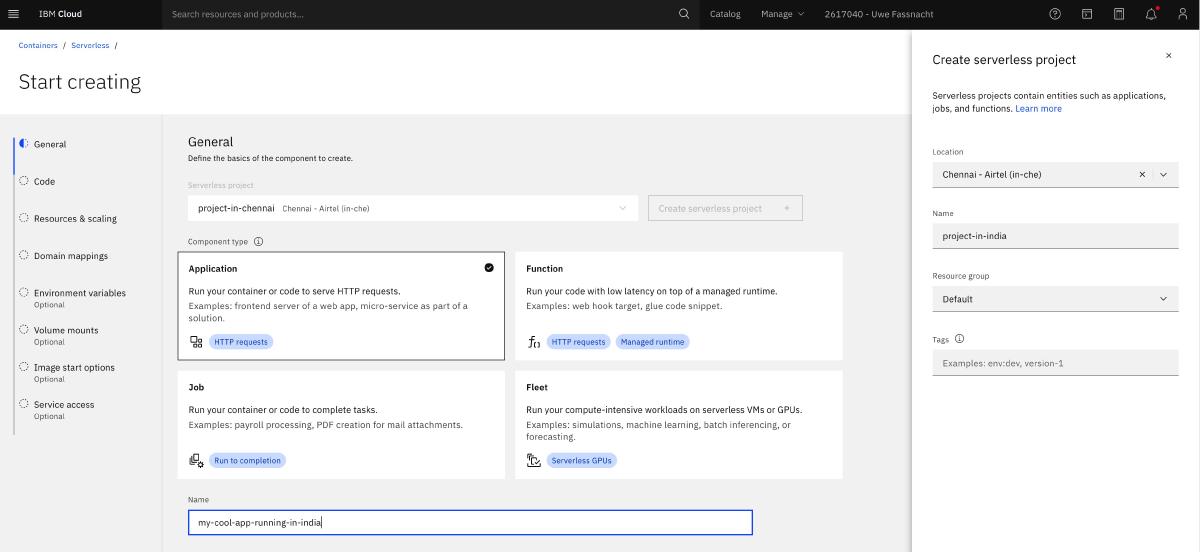
We’re excited to announce that IBM Cloud Code Engine is now generally available in the Chennai, India (in-che) region — expanding our serverless platform deeper into South Asia and giving customers in India a local deployment target for their cloud-native workloads.
What Is IBM Cloud Code Engine?#
IBM Cloud Code Engine is a fully managed, serverless platform that lets you run containerized workloads — applications, batch jobs, and event-driven functions — without ever having to think about the underlying infrastructure. IBM deploys, manages, and autoscales your cluster so you can focus entirely on writing code.
Whether you’re deploying a web API, processing data in a batch job, or building an event-driven microservice, Code Engine provides a single, unified deployment experience across all workload types:
- Applications — Deploy HTTP-driven workloads that scale automatically from zero to handle any amount of traffic, then scale back down to zero when idle — so you only pay for what you use.
- Batch jobs — Run compute-intensive, time-bounded workloads at scale without managing servers or Kubernetes clusters.
- Event-driven functions — Execute lightweight code in response to events from IBM Cloud services, Kafka topics, or custom event sources.
- Source-to-URL builds — Point Code Engine at your source code repository and it builds and deploys your container image automatically.
Why Chennai?#
The Chennai region (in-che) is hosted on Airtel infrastructure and is part of IBM Cloud’s Single-Campus Multi-Zone Region (SC-MZR) topology. It spans three independent availability zones — in-che-1, in-che-2, and in-che-3 — within a single campus designed with fault-independent power, cooling, networking, and physical security. This gives customers:
- Data residency in India — Keep workloads and data within India to meet compliance and regulatory requirements.
- Low latency — Serve end users across South India with significantly reduced network round-trips compared to routing through distant regions.
- High availability — The multi-zone architecture protects against zone-level failures automatically, with no manual intervention required.
How to Target the Chennai Region#
Switching to the Chennai region with the IBM Cloud CLI takes a single command:
ibmcloud target -r in-cheOnce targeted, create a new Code Engine project and deploy your application as you normally would. For full details on all supported regions and API endpoints, see the Code Engine regions documentation.
Chennai API Endpoints#
| Endpoint type | Address |
|---|---|
| Public API endpoint | api.in-che.codeengine.cloud.ibm.com |
| Private API endpoint | api.private.in-che.codeengine.cloud.ibm.com |
| Application URL (public) | <appname>.<uuid>.in-che.codeengine.appdomain.cloud |
| Application URL (private) | <appname>.<uuid>.private.in-che.codeengine.appdomain.cloud |
Getting Started#
New to Code Engine? The Getting started guide walks you through deploying your first “Hello World” application end to end in just a few minutes. You can also explore the Serverless web application tutorial for a more complete example using Code Engine alongside IBM Cloud Object Storage and Cloudant.
Useful Links#
| Resource | Link |
|---|---|
| Code Engine product overview | cloud.ibm.com/codeengine |
| Documentation home | cloud.ibm.com/docs/codeengine |
| Getting started guide | Getting started with Code Engine |
| Supported regions & endpoints | Code Engine regions |
| IBM Cloud global locations | IBM Cloud region and data center locations |
| Serverless web app tutorial | Serverless web application with Code Engine |
The Chennai expansion is part of IBM’s continued investment in the India market and our commitment to bringing enterprise-grade cloud services closer to customers. Ready to deploy?