2. Lab Environment
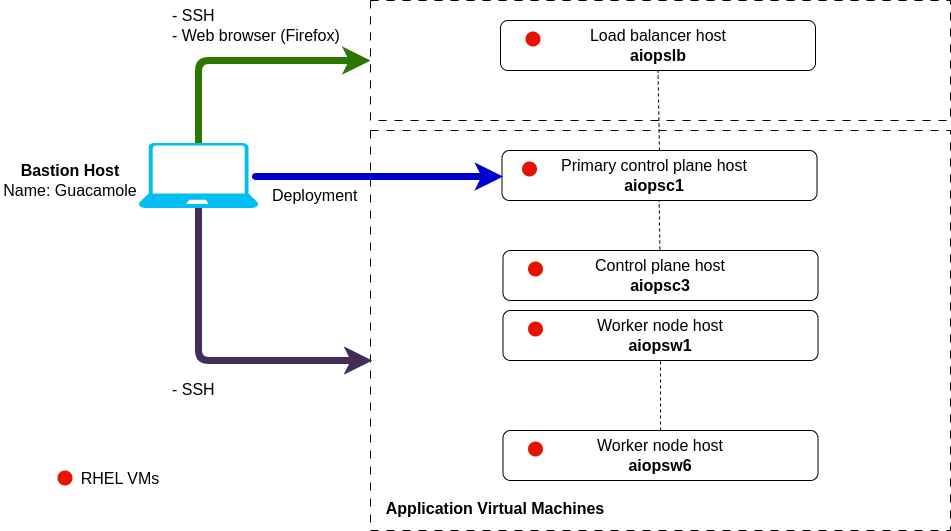
In this lab, you will initially connect to a bastion virtual machine that has Red Hat Enterprise Linux (RHEL) installed on it from which you will carry out the deployment. Once you have finished your installation, you will open a Firefox browser on this bastion host and log in to your newly installed AIOps instance.
In your environment, you will also have a set of ten Linux virtual machines installed with Red Hat Enterprise Linux 9.4. The specification and eventual use of these machines will be as follows:
- 1 x load balancer server -
aiopslb- 2 CPU, 16 Gi RAM, 500 Gi disk - 3 x control plane nodes -
aiopsc1toaiopsc3- 16 CPU 16 Gi RAM, 200 Gi disk + (2 x 200 Gi disks) - 6 x worker nodes -
aiopsw1toaioipsw6- 16 CPU, 46 Gi RAM, 200 Gi disk + (1 x 200 Gi disk)
A pre-provisioned Netcool server (netcoolvm) is also set up for you to use in subsequent labs.
One key objective of this lab is to expose the product public documentation to the students. With this in mind, each installation steps will reference the product documentation.
2.1: Prerequisites
Create an IBM ID
You will need an IBM ID to request and access your lab environment in IBM TechZone. You can create an IBM ID here.
Obtain your Entitlement key
Navigate to the IBM Container Software Library to obtain your entitlement key. The entitlement key is assigned to your IBM ID which will grant you access to the IBM Container Registry.
You can check your entitlement key by clicking View Library. Take note of this key as you will need it later in the Lab.

If your entitlement key is not valid for the Cloud Pak for AIOPs, you can register for a 60 day trial using the following link: Request trial.
2.2: Requesting a Lab Environment
Below is a live chart showing Tech Zone capacity in each available region. When requesting your environment it would be wise to select the region that has the most capacity available.
Follow these instructions for step by step guidance on requesting and accessing a lab environment in IBM Tech Zone.
Request Tech Zone environment: