Running AI natively on IBM i
LLaMa.cpp
Section titled “LLaMa.cpp”Solution report card
| Runs on IBM i? | ✅ | |
| On-prem | ✅ | |
| IBM Cloud | ✅ | |
| AI capabilities | Large Language Models | |
| Commercial support | ❌ | |
| Free to try? | ✅ | |
| Requirements | IBM i Open Source |
Overview
Section titled “Overview”LLaMa.cpp is a high-performance C/C++ implementation for running Large Language Models (LLMs) with minimal setup and state-of-the-art performance. It enables LLM inference locally and in the cloud across a wide range of hardware platforms - including IBM i!
The main goal of llama.cpp is to enable LLM inference with minimal setup and optimal performance on diverse hardware, making it an ideal solution for running AI workloads directly on IBM i systems.
Key Features & Capabilities
Section titled “Key Features & Capabilities”- Plain C/C++ implementation - No external dependencies required
- Optimized for IBM Power architecture - Native support for Power systems
- Multiple quantization options - 1.5-bit through 8-bit integer quantization for faster inference and reduced memory usage
- Hybrid inference support - CPU+GPU hybrid inference to partially accelerate models larger than total VRAM capacity
- Multiple backend support - Metal, BLAS, SYCL, Vulkan, and more
- OpenAI-compatible API server - Easy integration with existing AI applications
- Extensive model support - Works with Llama, Mistral, Gemma, and many other popular model families
Use Cases
Section titled “Use Cases”llama.cpp on IBM i is ideal for:
- Local AI inference - Run LLMs directly on your IBM i system without cloud dependencies
- Data privacy - Keep sensitive data on-premises while leveraging AI capabilities
- Low-latency applications - Eliminate network round-trips for real-time AI responses
- Cost optimization - Avoid per-token API costs by running models locally
- Custom AI solutions - Build AI-powered applications that integrate directly with IBM i data and workflows
- Development and testing - Experiment with different models and prompts in your development environment
Important Caveats
Section titled “Important Caveats”- No commercial support - Community-driven project without official enterprise support
- Hardware requirements - Performance depends on available CPU/memory resources
- Model size considerations - Larger models require more memory; quantization helps reduce requirements
- Learning curve - Requires familiarity with command-line tools and model management
- ⚠️ CRITICAL: Big-Endian Requirement - IBM i Power systems require big-endian GGUF models. Standard models from Hugging Face are little-endian and will NOT work. You must use models from models-for-i or convert models yourself on IBM i.
Installation
Section titled “Installation”llama.cpp is now available as an IBM i RPM package and can be easily installed using the yum package manager:
# Install llama.cpp via yum/QOpenSys/pkgs/bin/yum install llama-cppAfter installation, the llama-cli and llama-server binaries will be available in your PATH.
Getting Started with Models
Section titled “Getting Started with Models”CRITICAL: IBM i requires big-endian GGUF models. Standard Hugging Face models won’t work!
Option 1: Download Pre-Converted Big-Endian Models (Recommended)
Section titled “Option 1: Download Pre-Converted Big-Endian Models (Recommended)”The models-for-i organization provides GGUF models specifically converted for IBM i:
# Install Hugging Face CLI/QOpenSys/pkgs/bin/pip3 install huggingface-hub
# Download a big-endian model (look for "-be" suffix)cd /home/MYUSER/ai-modelshf download models-for-i/Llama-3.2-1B-Instruct-GGUF Llama-3.2-1B-Instruct-f32-be.gguf
# List available modelshf list models-for-i
Available Models at models-for-i:
- Llama 3.2 (1B, 3B variants)
- Mistral models
- Phi models
- And more - check https://huggingface.co/models-for-i
Option 2: Convert Models Yourself
Section titled “Option 2: Convert Models Yourself”If your desired model isn’t available in big-endian format:
Follow the instructions at: https://github.com/ajshedivy/models-for-i
Why Big-Endian? IBM i Power systems use big-endian byte order, while most computers (x86/ARM) use little-endian. GGUF files created on x86 systems won’t work on IBM i without conversion. Always look for models with “-be” suffix or convert them yourself on IBM i.
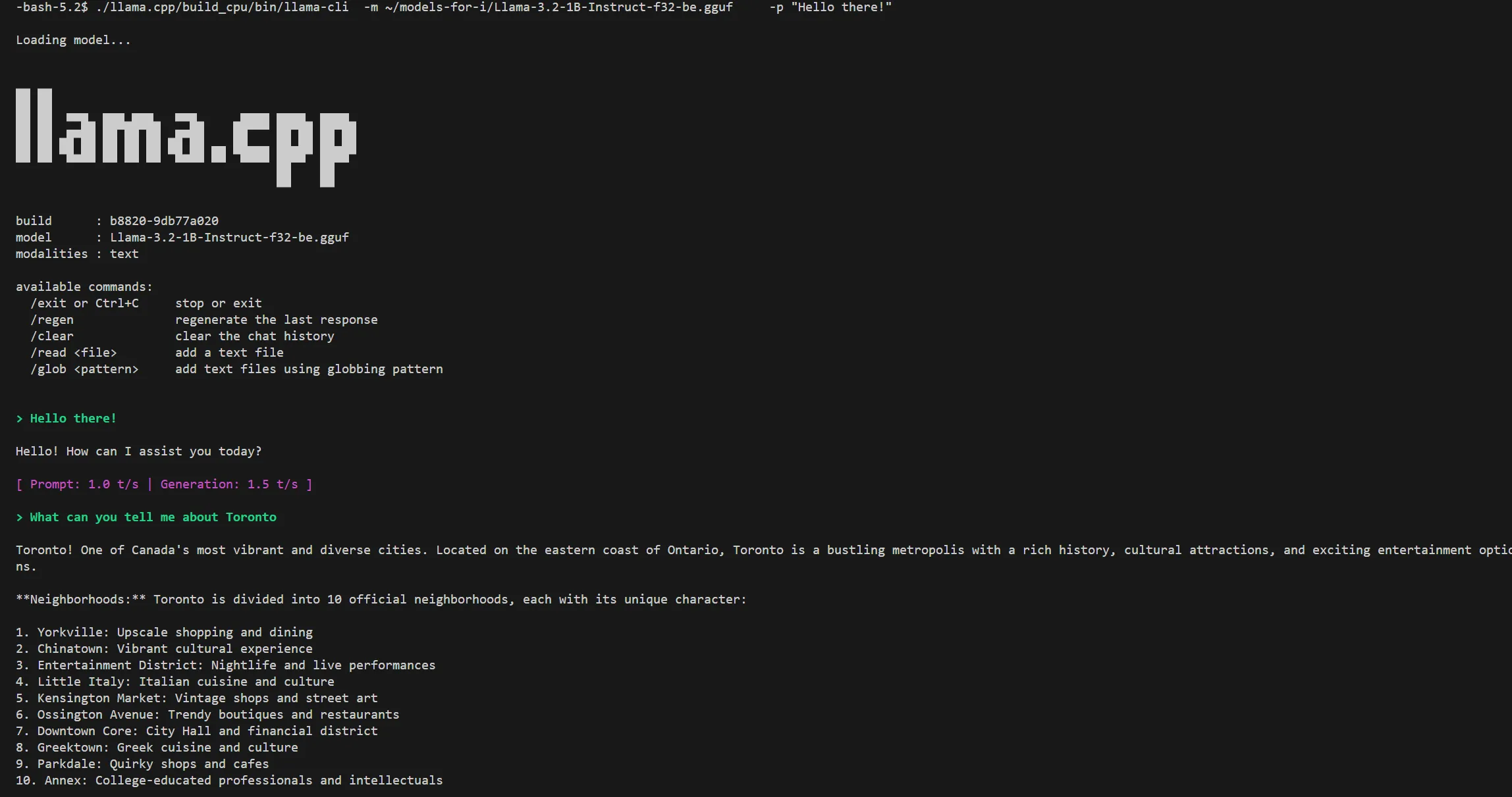
Practical Walkthroughs for Small Models (1B-3B)
Section titled “Practical Walkthroughs for Small Models (1B-3B)”Walkthrough 1: System Message Classification
Section titled “Walkthrough 1: System Message Classification”This walkthrough shows how to automatically categorize IBM i system messages by severity using AI.
Scenario
Section titled “Scenario”You want to automatically classify system messages as ERROR, WARNING, or INFO to prioritize which messages need immediate attention.
Why This Works Well with Small Models
Section titled “Why This Works Well with Small Models”- ✅ Simple classification task (3 categories)
- ✅ Short input text (single message at a time)
- ✅ Fast inference (~1-2 seconds per message)
- ✅ Includes keyword fallback for reliability
Step 1: Install and Start llama.cpp
Section titled “Step 1: Install and Start llama.cpp”# Install llama.cpp/QOpenSys/pkgs/bin/yum install llama-cpp
# Install Hugging Face CLI (required for downloading models)/QOpenSys/pkgs/bin/pip3 install huggingface-hub
# Create directory for modelsmkdir -p /home/MYUSER/ai-modelscd /home/MYUSER/ai-models
# Download a small big-endian model (perfect for classification)# CRITICAL: Must use big-endian models from models-for-ihf download models-for-i/Llama-3.2-1B-Instruct-GGUF Llama-3.2-1B-Instruct-f32-be.gguf
# Start the server (simple settings for classification)llama-server \ -m Llama-3.2-1B-Instruct-f32-be.gguf \ --host 0.0.0.0 \ --port 8080 \ --ctx-size 2048 \ --threads 8Why These Settings:
--ctx-size 2048- Small context is fine for single messages--threads 8- Moderate threading for fast response- Expected performance: 1-2 seconds per message
Step 2: Create the Message Classifier Script
Section titled “Step 2: Create the Message Classifier Script”import requestsimport json
LLAMA_API = "http://localhost:8080/v1/chat/completions"
def classify_message(message_text): """Classify a system message as ERROR, WARNING, or INFO"""
system_prompt = """You are a system message classifier. Classify each message as exactly one of: ERROR, WARNING, or INFO.
Classification Rules with Examples:
ERROR - System failures, critical issues, job failures:- "Object not found" = ERROR- "Function check" = ERROR- "Command ended due to error" = ERROR- "Access denied" = ERROR- "File cannot be opened" = ERROR
WARNING - Potential problems, resource constraints:- "Storage threshold exceeded" = WARNING- "Job queue at capacity" = WARNING- "Deprecated feature used" = WARNING
INFO - Normal operations, successful completions:- "Job started" = INFO- "Job log produced" = INFO- "Entry added" = INFO- "Command completed successfully" = INFO
Respond with ONLY one word: ERROR, WARNING, or INFO"""
response = requests.post(LLAMA_API, json={ "messages": [ {"role": "system", "content": system_prompt}, {"role": "user", "content": f"Classify: {message_text}"} ], "temperature": 0.1, # Low temperature for consistent classification "max_tokens": 10 })
classification = response.json()['choices'][0]['message']['content'].strip().upper()
# Validate response and extract first word if needed for word in classification.split(): if word in ['ERROR', 'WARNING', 'INFO']: return word
# Fallback: use keyword matching if AI fails message_lower = message_text.lower() if any(keyword in message_lower for keyword in ['not found', 'error', 'failed', 'failure', 'denied', 'cannot', 'function check', 'ended due to']): return 'ERROR' elif any(keyword in message_lower for keyword in ['warning', 'threshold', 'capacity', 'deprecated']): return 'WARNING' else: return 'INFO'
# Test with sample IBM i messagestest_messages = [ "CPF2105: Object MYFILE in MYLIB type *FILE not found", "CPI2191: Job 123456/QUSER/QZDASOINIT started", "CPF9898: Job log for job 123456/QUSER/QBATCH has been produced", "CPF9999: Function check. MCH1202 unmonitored by MYPGM at statement 0000000150", "CPI1131: Job schedule entry BACKUP added", "CPF2817: Copy command ended due to error"]
print("🔍 IBM i Message Classification Demo")print("="*80)
for msg in test_messages: classification = classify_message(msg)
# Color code output emoji = {"ERROR": "🔴", "WARNING": "🟡", "INFO": "🟢"} print(f"\n{emoji[classification]} {classification}") print(f" Message: {msg}")
print("\n" + "="*80)print("✅ Classification complete!")Step 3: Install Dependencies and Run
Section titled “Step 3: Install Dependencies and Run”# Install requests library (required for API calls)/QOpenSys/pkgs/bin/pip3 install requests
# Verify installationpython3 -c "import requests; print('✅ requests installed')"
# Run the classifierpython3 message_classifier.pyExpected Output:
🔍 IBM i Message Classification Demo================================================================================
🔴 ERROR   Message: CPF2105: Object MYFILE in MYLIB type *FILE not found
🟢 INFO   Message: CPI2191: Job 123456/QUSER/QZDASOINIT started
🟢 INFO   Message: CPF9898: Job log for job 123456/QBATCH has been produced
🔴 ERROR   Message: CPF9999: Function check. MCH1202 unmonitored by MYPGM
🟢 INFO   Message: CPI1131: Job schedule entry BACKUP added
🔴 ERROR   Message: CPF2817: Copy command ended due to error
================================================================================✅ Classification complete!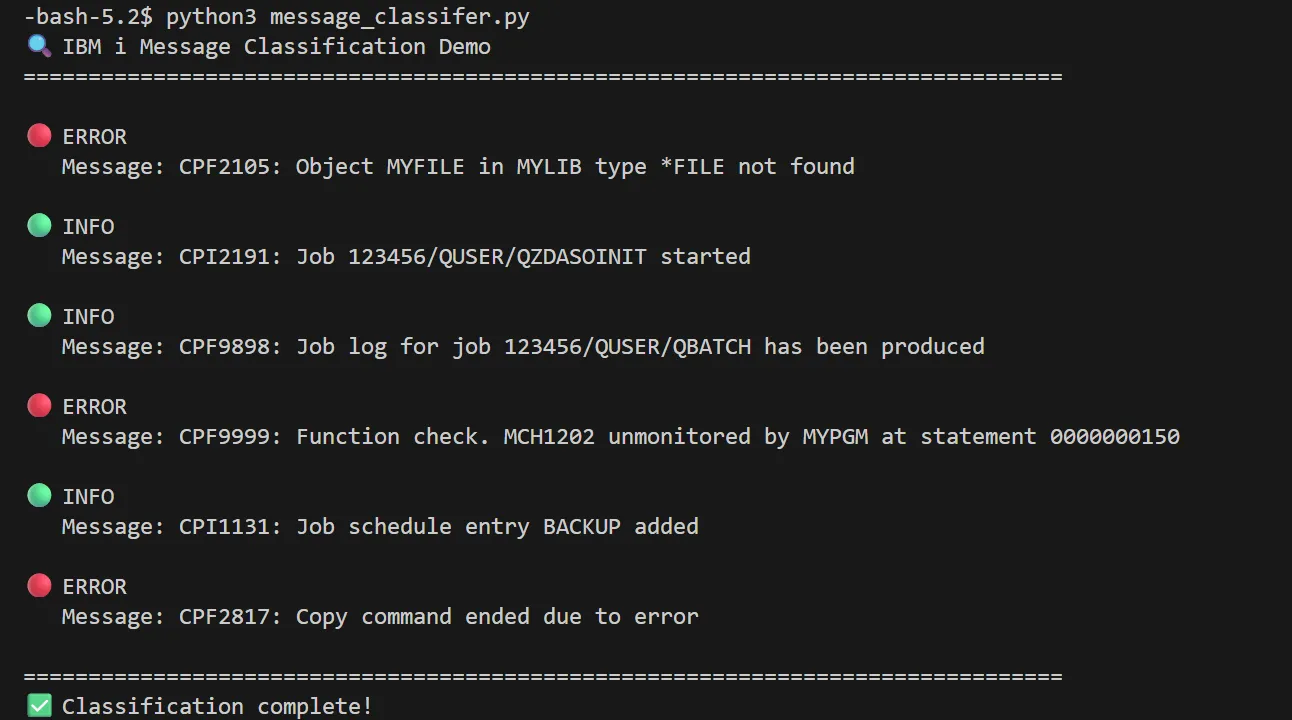
Step 4: Integrate with Real System Messages
Section titled “Step 4: Integrate with Real System Messages”# classify_qhst.py - Classify messages from QHSTimport ibm_db_dbiimport requests
LLAMA_API = "http://localhost:8080/v1/chat/completions"
def classify_message(message_text): """Classify a system message""" system_prompt = """Classify as ERROR, WARNING, or INFO. Respond with only the classification word."""
response = requests.post(LLAMA_API, json={ "messages": [ {"role": "system", "content": system_prompt}, {"role": "user", "content": f"Classify: {message_text}"} ], "temperature": 0.1, "max_tokens": 10 })
return response.json()['choices'][0]['message']['content'].strip().upper()
# Connect to DB2 and get recent messagesconn = ibm_db_dbi.connect()cursor = conn.cursor()
cursor.execute(""" SELECT MESSAGE_ID, MESSAGE_TEXT FROM TABLE(QSYS2.HISTORY_LOG_INFO( START_TIME => CURRENT TIMESTAMP - 1 HOURS )) WHERE MESSAGE_TYPE IN ('DIAGNOSTIC', 'ESCAPE', 'NOTIFY') FETCH FIRST 20 ROWS ONLY""")
messages = cursor.fetchall()conn.close()
# Classify each messageprint("🔍 Classifying Recent System Messages")print("="*80)
error_count = warning_count = info_count = 0
for msg_id, msg_text in messages: classification = classify_message(f"{msg_id}: {msg_text}")
if classification == 'ERROR': error_count += 1 print(f"🔴 ERROR") elif classification == 'WARNING': warning_count += 1 print(f"🟡 WARNING") else: info_count += 1 print(f"{msg_id} - {msg_text[:60]}...")
print("\n" + "="*80)print(f"📊 Summary: {error_count} errors, {warning_count} warnings, {info_count} info")# Install IBM DB2 driver (required for database access)/QOpenSys/pkgs/bin/yum install python39-ibm_db
# Run the QHST classifierpython3 classify_qhst.py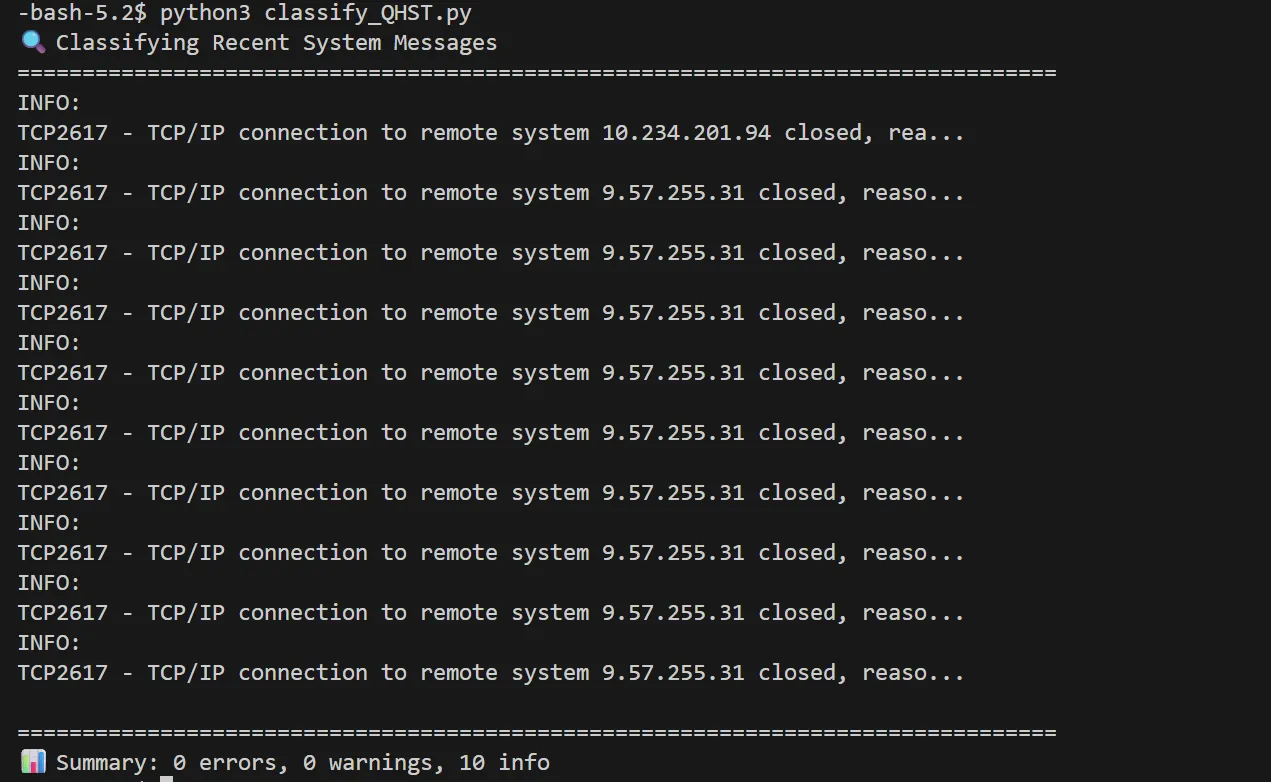
What This Demonstrates
Section titled “What This Demonstrates”- Fast Classification: 1-2 seconds per message with 1B model
- High Accuracy: Simple classification tasks work well with small models
- Real-time Processing: Can classify messages as they arrive
- Integration Ready: Easy to integrate with monitoring systems
- Cost Effective: No API costs, runs locally on IBM i
Walkthrough 2: Job Log Summarization
Section titled “Walkthrough 2: Job Log Summarization”This walkthrough shows how to automatically summarize IBM i job logs using AI, making it easier to understand what happened in a job without reading hundreds of lines.
Scenario
Section titled “Scenario”You want to quickly understand what happened in a job by getting a concise summary of its job log, highlighting key events, errors, and outcomes.
Why This Works Well with Small Models
Section titled “Why This Works Well with Small Models”- ✅ Focused summarization task (extract key points)
- ✅ Clear input/output structure
- ✅ Fast processing (~5-10 seconds for typical job log)
- ✅ Good results even with 1B-2B models
Step 1: Start llama.cpp Server
Section titled “Step 1: Start llama.cpp Server”# If not already running from Walkthrough 1, start the servercd /home/MYUSER/ai-models
# CRITICAL: Must use big-endian models from models-for-illama-server \ -m Llama-3.2-1B-Instruct-f32-be.gguf \ --host 0.0.0.0 \ --port 8080 \ --ctx-size 4096 \ --threads 8Why These Settings:
--ctx-size 4096- Larger context for job logs (can be 100+ lines)--threads 8- Good balance for summarization tasks- Expected performance: 5-10 seconds per job log
Step 2: Create the Job Log Summarizer
Section titled “Step 2: Create the Job Log Summarizer”import subprocessimport requestsimport ibm_db_dbi
LLAMA_API = "http://localhost:8080/v1/chat/completions"
def get_job_log(job_name, user, job_number): """Retrieve job log from QSYS2.JOBLOG_INFO
IMPORTANT: IBM i requires qualified job name in format: NUMBER/USER/NAME - Job number must be 6 digits (zero-padded) - User must be 10 characters (space-padded) - Job name must be 10 characters (space-padded)
Example: '095765/USER /QPADEV0001' """ conn = ibm_db_dbi.connect() cursor = conn.cursor()
# Format parameters according to IBM i requirements # Job number: 6 digits, zero-padded on left job_number_fmt = str(job_number).zfill(6)
# User: 10 characters, space-padded on right user_fmt = str(user).ljust(10)
# Job name: 10 characters, space-padded on right job_name_fmt = str(job_name).ljust(10)
# Construct qualified job name: NUMBER/USER/NAME qualified_job = f"{job_number_fmt}/{user_fmt}/{job_name_fmt}"
# CRITICAL: QSYS2.JOBLOG_INFO does NOT support parameter markers (?) # We must use string concatenation instead sql = f""" SELECT MESSAGE_TIMESTAMP, MESSAGE_ID, MESSAGE_TYPE, MESSAGE_TEXT FROM TABLE(QSYS2.JOBLOG_INFO('{qualified_job}')) ORDER BY ORDINAL_POSITION """
cursor.execute(sql)
log_entries = cursor.fetchall() conn.close() return log_entries
def summarize_job_log(log_entries): """Summarize job log using AI"""
# Format log for AI (limit to key messages) log_text = "Job Log:\n\n" for timestamp, msg_id, msg_type, msg_text in log_entries: # Focus on important message types if msg_type in ['COMPLETION', 'DIAGNOSTIC', 'ESCAPE', 'NOTIFY']: log_text += f"[{timestamp}] {msg_id} ({msg_type}): {msg_text}\n"
system_prompt = """You are a job log analyzer. Summarize the job log in 3-5 bullet points.
Focus on:- What the job did (main purpose)- Whether it completed successfully or failed- Any errors or warnings- Key outcomes or results
Keep it concise and clear. Use bullet points."""
response = requests.post(LLAMA_API, json={ "messages": [ {"role": "system", "content": system_prompt}, {"role": "user", "content": log_text} ], "temperature": 0.3, "max_tokens": 300 })
return response.json()['choices'][0]['message']['content']
def main(): print("📋 IBM i Job Log Summarizer") print("="*80)
# Example: Summarize a specific job # Replace with actual job details job_name = input("Enter job name (or press Enter for demo): ").strip() or "QZDASOINIT" user = input("Enter user (or press Enter for demo): ").strip() or "QUSER" job_number = input("Enter job number (or press Enter for demo): ").strip() or "123456"
print(f"\n🔍 Retrieving job log for {job_number}/{user}/{job_name}...")
try: log_entries = get_job_log(job_name, user, job_number)
if not log_entries: print("❌ No job log found. Job may not exist or you may not have authority.") return
print(f"✅ Retrieved {len(log_entries)} log entries")
print("\n🤖 Generating summary...") summary = summarize_job_log(log_entries)
print("\n" + "="*80) print("📝 JOB LOG SUMMARY") print("="*80) print(summary) print("="*80)
except Exception as e: print(f"❌ Error: {e}")
if __name__ == "__main__": main()Step 3: Create a Batch Job Log Summarizer
Section titled “Step 3: Create a Batch Job Log Summarizer”For analyzing multiple jobs at once:
import ibm_db_dbiimport requests
LLAMA_API = "http://localhost:8080/v1/chat/completions"
def get_recent_failed_jobs():    """Get jobs that ended abnormally in the last 24 hours"""    conn = ibm_db_dbi.connect()    cursor = conn.cursor()
    cursor.execute("""        SELECT JOB_NAME, AUTHORIZATION_NAME, JOB_NUMBER,               JOB_END_TIME, COMPLETION_STATUS        FROM TABLE(QSYS2.JOB_INFO(JOB_STATUS_FILTER => '*OUTQ'))        WHERE JOB_END_TIME >= CURRENT TIMESTAMP - 24 HOURS          AND COMPLETION_STATUS = 'ABNORMAL'        ORDER BY JOB_END_TIME DESC        FETCH FIRST 10 ROWS ONLY    """)
    jobs = cursor.fetchall()    conn.close()    return jobs
def quick_summarize(job_name, user, job_number):    """Quick summary of a job log"""    conn = ibm_db_dbi.connect()    cursor = conn.cursor()
    # Format parameters according to IBM i requirements    job_number_fmt = str(job_number).zfill(6)    user_fmt = str(user).ljust(10)    job_name_fmt = str(job_name).ljust(10)    qualified_job = f"{job_number_fmt}/{user_fmt}/{job_name_fmt}"
    # Get only error/escape messages for quick analysis    sql = f"""        SELECT MESSAGE_ID, MESSAGE_TEXT        FROM TABLE(QSYS2.JOBLOG_INFO('{qualified_job}'))        WHERE MESSAGE_TYPE IN ('ESCAPE', 'DIAGNOSTIC')        ORDER BY ORDINAL_POSITION DESC        FETCH FIRST 20 ROWS ONLY    """
    cursor.execute(sql)
    errors = cursor.fetchall()    conn.close()
    if not errors:        return "No errors found in job log."
    # Format for AI    error_text = "Errors:\n" + "\n".join([f"{mid}: {txt}" for mid, txt in errors])
    response = requests.post(LLAMA_API, json={        "messages": [            {"role": "system", "content": "Summarize the main error in one sentence."},            {"role": "user", "content": error_text}        ],        "temperature": 0.2,        "max_tokens": 100    })
    return response.json()['choices'][0]['message']['content']
# Main executionprint("🔍 Failed Jobs in Last 24 Hours")print("="*80)
failed_jobs = get_recent_failed_jobs()
if not failed_jobs:    print("✅ No failed jobs found!")else:    for job_name, user, job_num, end_time, status in failed_jobs:        print(f"\n📋 Job: {job_num}/{user}/{job_name}")        print(f"   Ended: {end_time}")        print(f"   🤖 AI Summary: ", end="")
        summary = quick_summarize(job_name, user, job_num)        print(summary)
print("\n" + "="*80)
Step 4: Run the Summarizers
Section titled “Step 4: Run the Summarizers”# Install dependencies (if not already installed)/QOpenSys/pkgs/bin/yum install python39-ibm_db/QOpenSys/pkgs/bin/pip3 install requests
# Run single job summarizerpython3 joblog_summarizer.py
# Or run batch analyzer for failed jobspython3 batch_summarizer.pyExpected Output:
🔍 Failed Jobs in Last 24 Hours================================================================================
📋 Job: 123456/QUSER/QBATCH   Ended: 2026-04-17 03:45:23   🤖 AI Summary: Job failed due to file MYFILE not found in library MYLIB (CPF2105)
📋 Job: 123457/QPGMR/COMPILE   Ended: 2026-04-17 02:30:15   🤖 AI Summary: Compilation failed with syntax error at line 150 in program MYPGM
================================================================================
What This Demonstrates
Section titled “What This Demonstrates”- Time Savings: Quickly understand job failures without reading full logs
- Pattern Recognition: AI identifies the root cause from multiple messages
- Batch Processing: Analyze multiple jobs efficiently
- Practical Use: Real-world scenario that small models handle well
- Fast Results: 5-10 seconds per job log summary
Walkthrough 3: Basic System Status Q&A
Section titled “Walkthrough 3: Basic System Status Q&A”This walkthrough shows how to create a simple Q&A system that answers questions about IBM i system status using AI.
Scenario
Section titled “Scenario”You want to ask simple questions about your IBM i system and get quick answers, like “How many active jobs are there?” or “What’s the CPU usage?”
Why This Works Well with Small Models
Section titled “Why This Works Well with Small Models”- ✅ Simple factual questions with clear answers
- ✅ Structured data from system tables
- ✅ Fast responses (~2-3 seconds per question)
- ✅ Good accuracy for straightforward queries
Step 1: Start llama.cpp Server
Section titled “Step 1: Start llama.cpp Server”# If not already running, start the servercd /home/MYUSER/ai-models
llama-server \ -m Llama-3.2-1B-Instruct-f32-be.gguf \ --host 0.0.0.0 \ --port 8080 \ --ctx-size 2048 \ --threads 8Step 2: Create the Q&A System
Section titled “Step 2: Create the Q&A System”import ibm_db_dbiimport requests
LLAMA_API = "http://localhost:8080/v1/chat/completions"
def get_system_info(): """Retrieve basic system information""" conn = ibm_db_dbi.connect() cursor = conn.cursor()
info = {}
# Get active jobs count cursor.execute("SELECT COUNT(*) FROM TABLE(QSYS2.ACTIVE_JOB_INFO())") info['active_jobs'] = cursor.fetchone()[0]
# Get CPU usage from SYSTEM_ACTIVITY_INFO table function cursor.execute(""" SELECT AVERAGE_CPU_UTILIZATION FROM TABLE(QSYS2.SYSTEM_ACTIVITY_INFO()) """) info['cpu_usage'] = cursor.fetchone()[0]
# Get ASP usage (using correct column names from ASP_INFO view) cursor.execute(""" SELECT ASP_NUMBER, TOTAL_CAPACITY, TOTAL_CAPACITY - TOTAL_CAPACITY_AVAILABLE AS USED_CAPACITY, TOTAL_CAPACITY_AVAILABLE FROM QSYS2.ASP_INFO WHERE ASP_NUMBER = 1 """) asp = cursor.fetchone() info['asp_total'] = asp[1] info['asp_used'] = asp[2] info['asp_free'] = asp[3]
# Get subsystem count (using correct column name from SUBSYSTEM_INFO view) cursor.execute("SELECT COUNT(*) FROM QSYS2.SUBSYSTEM_INFO WHERE SUBSYSTEM_STATUS = 'ACTIVE'") info['active_subsystems'] = cursor.fetchone()[0]
conn.close() return info
def answer_question(question, system_info): """Answer a question about system status"""
# Format system info for AI context = f"""Current IBM i System Status:- Active Jobs: {system_info['active_jobs']}- CPU Usage: {system_info['cpu_usage']}%- ASP 1 Total Capacity: {system_info['asp_total']} GB- ASP 1 Used: {system_info['asp_used']} GB- ASP 1 Free: {system_info['asp_free']} GB- Active Subsystems: {system_info['active_subsystems']}"""
system_prompt = """You are an IBM i system status assistant. Answer questions about the system using the provided data.
Rules:- Give short, direct answers (1-2 sentences)- Use the exact numbers from the data- If the question can't be answered with the available data, say so- Be helpful and clear"""
response = requests.post(LLAMA_API, json={ "messages": [ {"role": "system", "content": system_prompt}, {"role": "user", "content": f"{context}\n\nQuestion: {question}"} ], "temperature": 0.1, "max_tokens": 150 })
return response.json()['choices'][0]['message']['content']
def main(): print("🤖 IBM i System Status Q&A") print("="*80)
# Get current system info print("📊 Gathering system information...") system_info = get_system_info() print("✅ System data retrieved\n")
# Example questions questions = [ "How many jobs are currently active?", "What is the current CPU usage?", "How much disk space is free on ASP 1?", "Is the system busy right now?", "How many subsystems are running?" ]
for question in questions: print(f"❓ {question}") answer = answer_question(question, system_info) print(f"💡 {answer}\n")
print("="*80) print("\n💬 Interactive mode - ask your own questions!") print("(Type 'quit' to exit)\n")
while True: user_question = input("❓ Your question: ").strip()
if user_question.lower() in ['quit', 'exit', 'q']: print("👋 Goodbye!") break
if not user_question: continue
# Refresh system info for each question system_info = get_system_info() answer = answer_question(user_question, system_info) print(f"💡 {answer}\n")
if __name__ == "__main__": main()Step 3: Run the Q&A System
Section titled “Step 3: Run the Q&A System”# Install dependencies (if not already installed)/QOpenSys/pkgs/bin/yum install python39-ibm_db/QOpenSys/pkgs/bin/pip3 install requests
# Run the Q&A systempython3 system_qa.pyExpected Output:
🤖 IBM i System Status Q&A================================================================================📊 Gathering system information...✅ System data retrieved
❓ How many jobs are currently active?💡 There are currently 1,247 active jobs on the system.
❓ What is the current CPU usage?💡 The CPU usage is at 23%, which indicates moderate activity.
❓ How much disk space is free on ASP 1?💡 ASP 1 has 450 GB of free space available out of 1000 GB total capacity.
❓ Is the system busy right now?💡 No, with 23% CPU usage and 1,247 active jobs, the system is operating at normal levels.
❓ How many subsystems are running?💡 There are 15 active subsystems currently running.
================================================================================
💬 Interactive mode - ask your own questions!(Type 'quit' to exit)
❓ Your question: _
Step 4: Extend with More Data Sources
Section titled “Step 4: Extend with More Data Sources”You can easily extend this to answer questions about other system aspects:
# Extended version with more data sourcesdef get_extended_system_info():    """Get comprehensive system information"""    conn = ibm_db_dbi.connect()    cursor = conn.cursor()
    info = get_system_info()  # Get basic info
    # Add database info    cursor.execute("""        SELECT COUNT(*) FROM QSYS2.SYSTABLES        WHERE TABLE_SCHEMA NOT LIKE 'Q%'    """)    info['user_tables'] = cursor.fetchone()[0]
    # Add recent job failures    cursor.execute("""        SELECT COUNT(*)        FROM TABLE(QSYS2.JOB_INFO(JOB_STATUS_FILTER => '*OUTQ'))        WHERE JOB_END_TIME >= CURRENT TIMESTAMP - 1 HOURS          AND COMPLETION_STATUS = 'ABNORMAL'    """)    info['recent_failures'] = cursor.fetchone()[0]
    # Add message queue depth    cursor.execute("""        SELECT COUNT(*) FROM QSYS2.MESSAGE_QUEUE_INFO        WHERE MESSAGE_QUEUE_LIBRARY = 'QSYS'          AND MESSAGE_QUEUE_NAME = 'QSYSOPR'    """)    info['qsysopr_messages'] = cursor.fetchone()[0]
    conn.close()    return info
What This Demonstrates
Section titled “What This Demonstrates”- Natural Language Interface: Ask questions in plain English
- Real-time Data: Always gets current system status
- Fast Responses: 2-3 seconds per question with 1B model
- Extensible: Easy to add more data sources
- User-Friendly: No need to know SQL or system commands
Performance Tips
Section titled “Performance Tips”- Use quantized models - Q4_K_M or Q5_K_M offer good balance of quality and performance
- Adjust context size - Use
--ctx-sizeto match your needs (smaller = faster) - Enable threading - Use
-tflag to specify number of threads based on your CPU cores - Monitor memory - Larger models require more RAM; consider model size vs. available memory
- Batch processing - Process multiple requests together when possible for better throughput
Additional Resources
Section titled “Additional Resources”- Official llama.cpp GitHub Repository
- Model Downloads (Hugging Face)
- IBM i Open Source Documentation
- llama.cpp Documentation
scikit-learn (SKLearn)
Section titled “scikit-learn (SKLearn)”Solution report card
| Runs on IBM i? | ✅ | |
| On-prem | ✅ | |
| IBM Cloud | ✅ | |
| AI capabilities | Machine Learning Deep Learning |
|
| Commercial support | ❌ | |
| Free to try? | ✅ | |
| Requirements | IBM i Open Source |
scikit-learn provides robust machine learning capabilities for Python programs. It provides support for a number of capabilities including classification, regression, and clustering.
The SciKit-Learn packages for Python are available in RPM form and can be installed via:
/QOpenSys/pkgs/bin/yum install python39-scikit-learn