watsonx Assistant
Solution report card
| Runs on IBM i? | ❌ | |
| On-prem | ✅ | |
| IBM Cloud (SaaS) | ✅ | |
| AWS Marketplace | ✅ | |
| AI capabilities | Chatbot | |
| Commercial support | ✅ | |
| Free to try? | ✅ (trial available) | |
| Requirements | IBM Cloud account or on-premises watsonx deployment; IBM i connectivity via REST APIs |
What is watsonx Assistant?
Section titled “What is watsonx Assistant?”watsonx Assistant is designed to make it simple enough for anyone to build a virtual assistant. Building, testing, publishing, and analyzing your assistant can be done in one simple and intuitive interface.
Use IBM® watsonx™ Assistant to build your own branded live chatbot into any device, application, or channel. Your chatbot, which is also known as an assistant, connects to the customer engagement resources you already use to deliver an engaging, unified problem-solving experience to your customers.
With watsonx Assistant, you can:
- Create AI-driven conversational flows
- Embed existing help content
- Connect to your customer service teams
- Bring the assistant to your customers where they are (such as social media platforms)
- Track customer engagement and satisfaction
For IBM i teams, custom extensions can be added to integrate with Db2 data.
Building assistants
Section titled “Building assistants”Planning your assistant
Section titled “Planning your assistant”| Step | Description |
|---|---|
| Select an initial channel | Where will customers use your assistant? |
| Select starting domain | What topic domain can your assistant unify and automate? |
| Outline frequent topics | What are the most frequent topics which are mostly informational in nature? |
| Collect content sources | What help content is available to customers today? |
| Plan handoff strategy | How should customers be routed to human agents? |
Creating your assistant
Section titled “Creating your assistant”You build your assistant by defining actions.
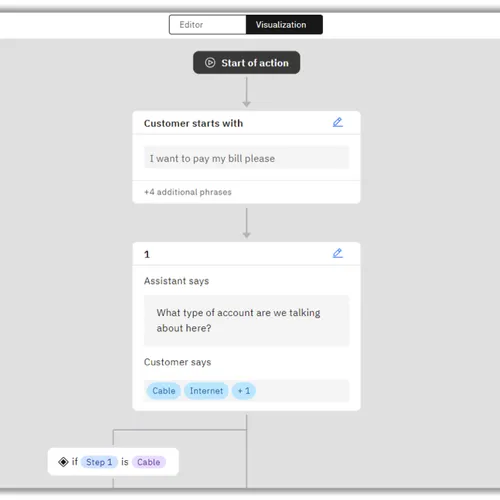
An action represents a discrete outcome that you want your assistant to be able to accomplish in response to a user’s request. An action comprises the interaction between a customer and the assistant about a particular question or request. This interaction begins with the user input that starts the action (for example, I want to withdraw money). It might then include more exchanges as the assistant gathers more information, and it ends when the assistant carries out the request or answers the customer’s question.
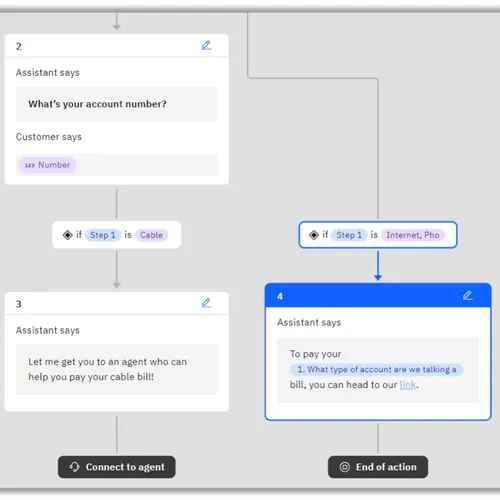
An action consists of one or more steps. The steps in an action define the conversation turns that follow the initial customer input that triggered the action. In a simple case, a step might consist of a direct answer to a question from the customer; for example, if the customer asks What are your business hours?, a one-step action might reply with We are open Monday through Friday from 9 AM to 5 PM..
More commonly, though, an action requires multiple steps to fully understand the customer’s request. For our I want to withdraw money example, we need more information:
- Which account should the money come from?
- What is the amount to withdraw?
Each of these follow-up questions represents a step in the action.
When a step asks for information from the user, the user’s response is stored as an action variable. By referring to the action variables stored by previous steps, you can construct step conditions based on your customer’s previous responses.
Deployment options
Section titled “Deployment options”| Option | Description |
|---|---|
| IBM Cloud SaaS | Fully managed, multi-tenant service — fastest to get started |
| On-premises | Self-hosted for data residency and compliance requirements |
Connecting watsonx Assistant to IBM i
Section titled “Connecting watsonx Assistant to IBM i”| Integration pattern | How |
|---|---|
| REST API tools | Expose IBM i business functions as OpenAPI-defined tools; assistants call them like any other service |
Define a custom extension in the assistant and specify OpenAPI specification for REST server running on IBM i to access Db2 data. Then use the extension in one of the steps of the assistant. See Integrating Watsonx Assistant Chatbot With Db2 for end-to-end example with IBM i data.