Installation
Prerequisites
Before installing the add-in, ensure the following requirements are met:
Microsoft Excel (Office 365 Online, Mac or Windows)
Active internet connection
IBM account - Complete the sign up form if you don’t have an account yet
Install
In order to use IBM Envizi Emissions API for Excel, there are two options to install:
Install from the Microsoft Marketplace (Recommended)
Sideload using a manifest.xml file
Important
Note that Excel custom functions are available on the following platforms:
Office on the web
- Office on Windows
Microsoft 365 subscription
Retail perpetual Office 2016 and later
Volume-licensed perpetual Office 2021 and later
Office on Mac
Excel custom functions aren’t currently supported in the following:
Office on iPad
Volume-licensed perpetual versions of Office 2019 or earlier on Windows
For more information, see Supported platforms.
Calculation Mode Tip
After installation, change the calculation mode to Manual to prevent unnecessary API calls:
Go to Formulas → Calculation Options.
Select Manual.
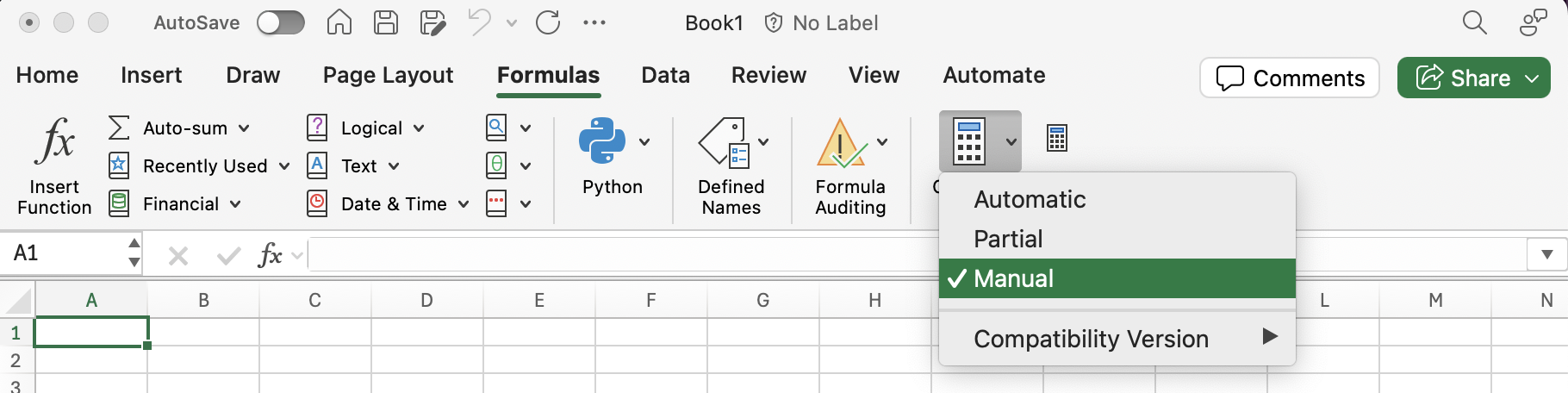
To recalculate a formula in manual calculation mode either press F9 or do the following:
Select the cell
Press F2 (this puts the cell into edit mode)
Press Enter