
 Monitor the health and performance of your running flows by viewing flow metrics. Flow metrics provide insights into uptime, restarts, and checkpoints.
When you run a flow, the Flow metrics tab is available next to the Output events tab. Click the Flow metrics tab to view real-time metrics about your flow.
Flow health
The Flow health section displays the current state of your flow, including the following metrics:
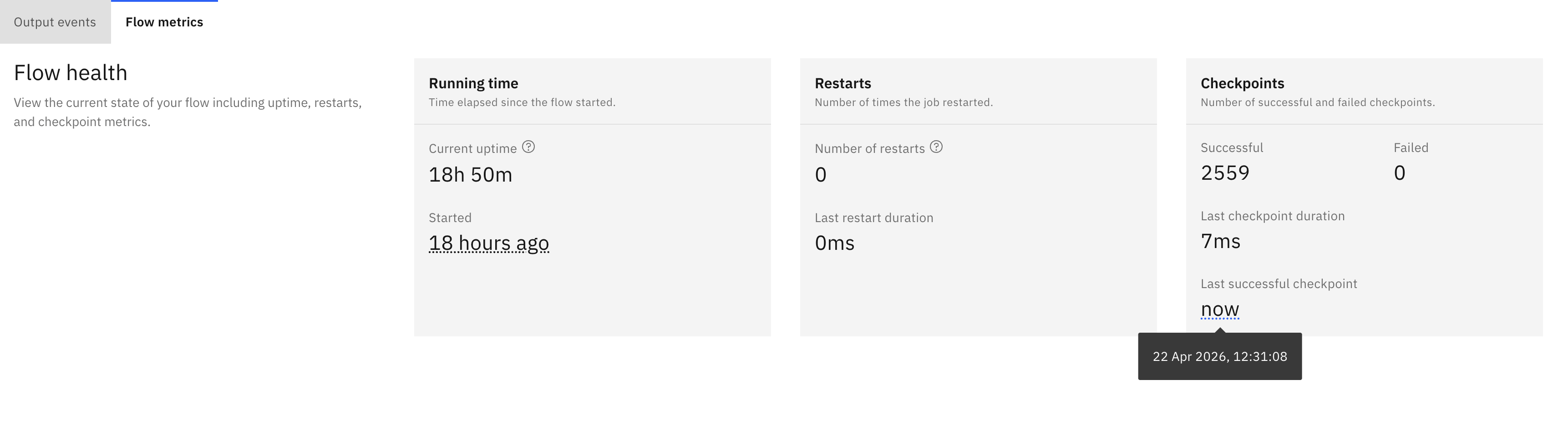
- Running time:
- Current uptime: time since the flow was last started.
- Started on: timestamp when the flow was first started.
- Restarts:
- Number of restarts: total number of times the job has restarted due to failures or manual intervention.
- Last restart duration: time taken to complete the last successful restart.
- Checkpoints:
- Successful: number of successful checkpoints.
- Failed: number of failed checkpoints.
- Last checkpoint duration: time taken to complete the last successful checkpoint.
- Last successful checkpoint: time elapsed since the last successful checkpoint, displayed as relative time (for example, “now” or “3m ago”). Hover over the value to see the exact timestamp in your local time zone.
Event activity
 The Event activity section displays information for both event source and event destination nodes in your flow:
- Event source activity table displays the following information for each event source:
- Name: the event source node name.
- Number of events: total number of events received by the event source.
- Events per second: the rate at which events are being processed through the event source, measured in records per second. Displays a single value when parallelism is 1, or a range (minimum to maximum) across all parallel tasks when parallelism is greater than 1.
- Bytes read: total bytes read from the Kafka topic.
- Message lag: difference between the latest message offset and the last processed message in milliseconds.
 Latest Flink watermark: timestamp of the latest watermark emitted by the event source.
- Event destination activity table displays the following information for each event destination:
- Name: the event destination node name.
- Number of events: total number of events sent to the destination.
- Events per second: the rate at which events are being processed through the event destination, measured in records per second. Displays a single value when parallelism is 1, or a range (minimum to maximum) across all parallel tasks when parallelism is greater than 1.
- Bytes written: total bytes written to the Kafka topic.
- Latest Flink watermark: timestamp of the latest watermark emitted by the event destination.
Using flow metrics for troubleshooting and optimization
The Flow metrics tab provides actionable insights that help you identify and resolve performance issues in your event processing pipelines. Here are some common scenarios and recommended actions:
Low events per second
If the Events per second metric shows a low value (for example, less than expected throughput):
- Check message lag: high message lag combined with low throughput indicates that the flow is falling behind. Consider scaling up Flink resources or optimizing your processing logic.
- Review checkpoint duration: long checkpoint durations can slow down processing. If Last checkpoint duration is high, consider adjusting checkpoint intervals or optimizing the state size.
- Examine restarts: frequent restarts (high Number of restarts) can impact throughput. Check the application logs to identify and resolve the root cause of failures.
High message lag
If Message lag is increasing over time:
- Scale resources: increase Flink parallelism or allocate more resources to handle the event volume.
- Optimize processing logic: review your flow for inefficient operations, such as complex transformations or joins that might be slowing down event processing.
- Check source throughput: verify that the event source is producing events faster than your flow can consume them.
Checkpoint failures
If Failed checkpoints are increasing:
- Review state size: large state sizes can cause checkpoint timeouts. Consider using state TTL or optimizing your windowing operations.
- Check storage performance: slow checkpoint storage can lead to failures. Verify that your persistent storage has adequate performance.
- Examine error logs: look for specific error messages in the Flink logs to identify the root cause.
Watermark delays
If Latest Flink watermark is significantly behind the current time:
- Check for late events: late-arriving events can delay watermark progression. Review your watermark strategy and consider adjusting the allowed lateness.
- Identify slow sources: if one event source has a delayed watermark compared to others, it may be experiencing issues or receiving out-of-order events.
- Review event time assignment: ensure that event timestamps are correctly assigned and reflect the actual event time.
Example insights and actions
Scenario 1: Detecting a bottleneck
- Observation: the event source shows 1000 events per second, but the event destination shows only 100 events per second.
- Insight: there is a processing bottleneck between the source and destination.
- Action: review the intermediate processing nodes for inefficient operations, add parallelism, or optimize the transformation logic.
Scenario 2: Identifying data quality issues
- Observation: the message lag is zero, but events per second is unexpectedly low.
- Insight: the source topic may have fewer events than expected, or events are being filtered out.
- Action: verify that the source topic is receiving the expected data and review the filter conditions in your flow.
Scenario 3: Monitoring recovery after failure
- Observation: the number of restarts increased, and the current uptime is recent.
- Insight: the flow recently recovered from a failure.
- Action: monitor the checkpoint success rate and processing throughput to ensure stable recovery. Investigate the logs to prevent future failures.