Lab Environment
In this lab, you will have access to three RHEL virtual machines plus a bastion virtual machine that will let you access the overall deployment:
- Bastion Host - a RHEL VM named
bastion-gym-lanthat will be used as the bastion host for the lab network. This Bastion host has access to all lab VMs and will be your primary workstation for these labs. - Concert Host - a RHEL VM named
concertthat has pre-installed IBM Concert with embedded Keycloak identity provider. - OpenLDAP Host - a RHEL VM named
blueboxthat has pre-installed OpenLDAP server configured as a user directory.
Software Versions
The following software versions are used in the Lab environment:
- IBM Concert: v3.0.0
- Keycloak: v26.6.2 embedded with Concert
- OpenLDAP: v2.6.8
- RHEL: 9.4
Lab Architecture
The following diagram describes the infrastructure for the Lab:
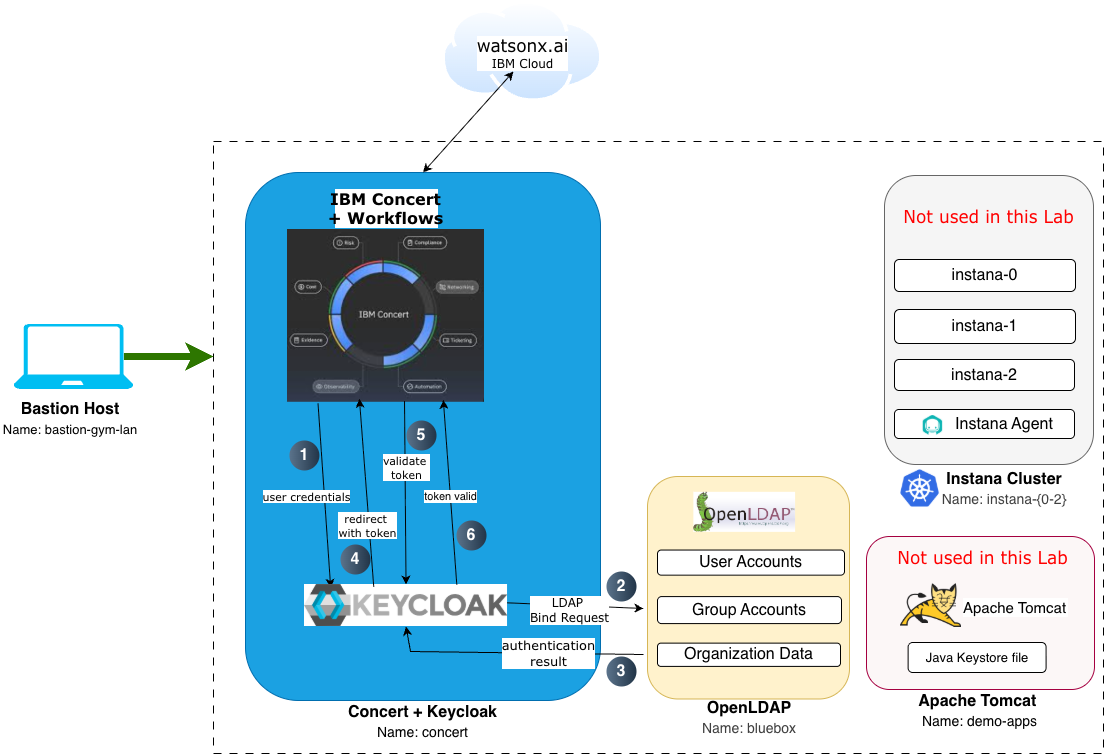
Architecture Components
1. Bastion Host
- Purpose: Entry point and workstation for lab activities
- Access: Remote desktop via TechZone
- Tools: Firefox browser, Terminal, Text Editor
- Connectivity: SSH access to all lab VMs
2. Concert Host
- Purpose: IBM Concert platform with embedded Keycloak
- Services:
- Concert UI:
https://concert.ibmdte.local:12443/concert/ - Keycloak Admin Console:
https://concert.ibmdte.local:13443/sys/internal/kc/ - Concert API:
https://concert.ibmdte.local:12443
- Concert UI:
- Pre-configured: Concert installation complete, Keycloak embedded and running
3. OpenLDAP Host
- Purpose: Centralized user directory
- Service: OpenLDAP server on port 389
- Base DN:
dc=example,dc=com - Pre-configured: OpenLDAP installed via Ansible automation
- Access: LDAP protocol from Keycloak and command-line tools
Authentication Flow
The diagram below illustrates the SSO authentication flow in this lab environment:
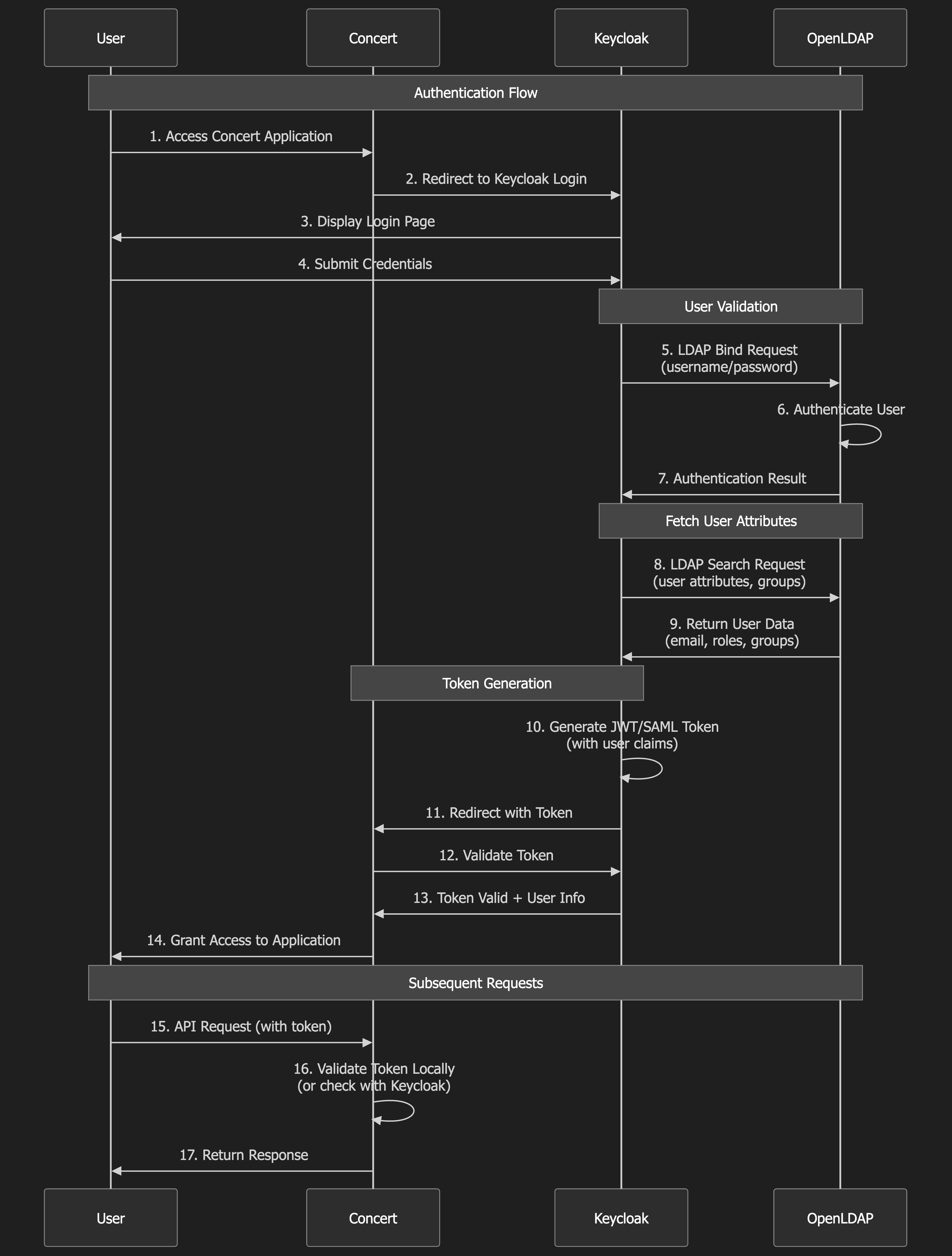
Flow Steps:
- User accesses Concert UI from Bastion Host
- Concert redirects to Keycloak for authentication
- Keycloak queries OpenLDAP to validate user credentials
- OpenLDAP returns user information and group memberships
- Keycloak generates OIDC token with user roles
- User is redirected back to Concert with authentication token
- Concert validates token and grants access based on roles
Prerequisites
IBM ID
Create an IBM ID
You will need an IBM ID to request and access your lab environment in IBM TechZone. You can create an IBM ID here.
Entitlement Key
Obtain your Entitlement key
Navigate to the IBM Container Software Library to obtain your entitlement key. The entitlement key is assigned to your IBM ID which will grant you access to the IBM Container Registry.
You can check your entitlement key by clicking View Library. Take note of this key as you will need it later in the Lab.

Instana license keys
Required when requesting the lab environment:
- Agent / Download Key
- Sales Key
IBMers and IBM Business Partners can get license keys from the Partner Access to Instana presentation.
Note: Keys are rotated every 6 months so please check at time of requesting lab.
While this lab uses pre-installed software, the entitlement key may be required for TechZone environment provisioning.
Browser Requirements
This lab requires a modern web browser with JavaScript enabled. Firefox is pre-installed on the Bastion Host and is the recommended browser for this lab.
Browser Configuration:
- Accept self-signed certificates (lab uses internal certificates)
- Enable cookies for session management
- Allow pop-ups from Concert and Keycloak domains
Knowledge Prerequisites
Before starting this lab, you should be familiar with:
- Basic Linux command-line operations (SSH, file editing)
- Web browser navigation
- Basic understanding of authentication concepts
- Familiarity with IBM Concert (helpful but not required)
Lab Environment Access
Requesting a Lab Environment
Below is a live chart showing Tech Zone capacity in each available region. When requesting your environment it would be wise to select the region that has the most capacity available.
Follow these instructions for step by step guidance on requesting and accessing a lab environment in IBM Tech Zone.
Request Tech Zone environment:
Next Steps
Now that you understand the lab environment and have verified access to all components, proceed to the Lab Preparation section where you will:
- Gather all necessary credentials
- Create a credentials file for easy reference
- Verify OpenLDAP installation
- Access Keycloak Admin Console
- Prepare your environment for the configuration exercises
Keep this architecture diagram handy as a reference throughout the lab. Understanding the component relationships will help you troubleshoot issues and understand the authentication flow.