No More Asking a Robot to Read Your Code for You: Native PL/I Macro Support in Z Open Editor 6.7.0
If you write PL/I for IBM Z®, you have probably stared at your editor and thought: "Why is it yelling at me? This code compiles fine."
The answer, almost certainly, is macros.
The old approach (a.k.a. "please hold while we outsource your parsing")
PL/I's macro preprocessor is powerful. Before the compiler sees your code, a preprocessing step evaluates %IF/%THEN/%ELSE branches, expands %DECLAREd variables, calls %PROCEDUREs, and produces a clean stream of plain PL/I for the compiler to process.
The editor, however, was not the compiler. It saw what you typed, raw macros and all, and had to make sense of it. The workaround has long been a configurable external preprocessor: point the editor to a local binary or a remote preprocessor running on z/OS®, and it runs your source through the preprocessor, compares the result with the original source, and:
- Color the original source to show which tokens change after preprocessing
- Shows the preprocessed text in a hover on those highlighted tokens
- Report errors only against the preprocessed output, so squiggly red lines reflect real compiler errors rather than complaints about unexpanded directives
This approach still works, and it remains available. However, it has a limitation that frustrated many users: macro declarations and procedure definitions all received the same flat color, and hovering over them showed what a token expanded to — but not why. The preprocessor expands them away entirely, so the diff can only indicate that they are gone. You could see the output, but not the meaning: not what type a variable was, not what value it currently held, and not where a procedure was declared.
What changed in 6.7.0
We built a native macro preprocessor directly into the editor. No external binary, remote connection, or configuration is required. Open a .pli file and the editor understands your macros right out of the box.
More than simply eliminating setup friction, the native preprocessor provides a significantly better editing experience:
Semantically-aware syntax coloring. Macro variables, macro procedure declarations, and regular PL/I code are each colored distinctly and correctly because the editor now understands what each token is, not just that it differs from external output.
Rich, live hover information. Hover over a %DECLAREd variable and see its type and current value at that point in the file. Hover over a macro procedure and see the procedure signature. The information reflects the actual macro state rather than a diff artifact.
Go to Declaration for macros. You can now navigate to the declaration of a macro variable or procedure in the same as any other PL/I symbol. Click through, jump back. It works exactly as expected.
Errors that make sense. Invalid or incorrect macro directives are flagged directly where they appear, and errors in the resulting code are reported against the post-preprocessed view so that every diagnostic reflects an actual issue.
A quick example
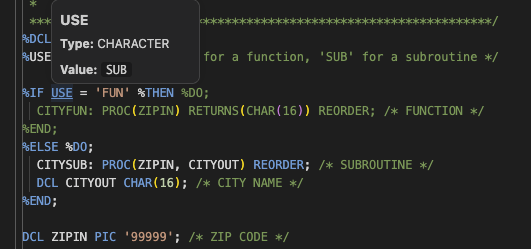
Here is the classic "ZIP code lookup" example from the PL/I Programming Guide, a source file that uses %IF/%ELSE to emit either a function or a subroutine depending on a macro variable:
 %DCL USE CHAR;
 %USE = 'SUB';   /* 'FUN' for a function, 'SUB' for a subroutine */

 %IF USE = 'FUN' %THEN %DO;
   CITYFUN: PROC(ZIPIN) RETURNS(CHAR(16)) REORDER;
 %END;
 %ELSE %DO;
   CITYSUB: PROC(ZIPIN, CITYOUT) REORDER;
   DCL CITYOUT CHAR(16);
 %END;

   DCL ZIPIN PIC '99999';
  ...
Without a preprocessor configured, the editor sees both procedure declarations simultaneously and flags them as conflicting errors because, from the raw parser's point of view, both branches appear to be active at the same time.
With the external preprocessor configured, those errors disappear because the editor receives the post-processed output and knows which branch was taken. Hovering over a highlighted token shows what it expanded to, but not why. %USE, %DCL, and the CITYSUB: label all receive the same flat coloring, and because the preprocessor expands them away entirely, the diff can only indicate that they are gone. It cannot tell the editor what they represent, what type USE is, or what its current value is.
With the native preprocessor, the editor evaluates %USE = 'SUB', takes the correct branch, and shows you only CITYSUB, with proper semantic coloring for every macro token, a hover on USE that shows its type and current value 'SUB', and Go to Declaration support for both the variable and the procedure. No false errors appear, and no context is lost.
What the native preprocessor handles
The implementation supports the full standard PL/I macro language:
| Category | What's supported |
|---|---|
| Variable declarations | %DECLARE / %DCL — scalar and array CHAR and FIXED variables |
| Assignment | %var = expr; with full expression evaluation |
| Conditionals | %IF / %THEN / %ELSE / %DO / %END |
| Loops | %DO...%END with %ITERATE and %LEAVE |
| Control flow | %GOTO |
| Macro procedures | %label: PROC(...) [RETURNS(type)]; with ANSWER/ANS and RETURN |
| Activation | %ACTIVATE / %DEACTIVATE with SCAN, RESCAN, NORESCAN |
| Built-in functions | All 30+ standard preprocessor built-ins: COLLATE, COPY, COUNTER, DIMENSION, HBOUND, LBOUND, INDEX, LENGTH, LOWERCASE, UPPERCASE, MAX, MIN, SUBSTR, TRIM, TRANSLATE, VERIFY, SYSPARM, SYSTEM, SYSVERSION, COMPILEDATE, COMPILETIME, MACNAME, PARMSET, and more |
| Compiler options | %PROCESS directives: MACRO(CASE(...)), MACRO(DBCS(...)), MACRO(FIXED(...)), MACRO(RESCAN(...)), LP(32|64), SYSPARM(...), CMPAT(...) |
What about the external preprocessor?
The external preprocessor option is not going away. It remains the right tool for one important use case: non-standard preprocessing. If your codebase uses custom macros or preprocessing syntax beyond what the PL/I compiler natively defines, the external preprocessor remains the mechanism that handles it.
However, if you use the external preprocessor only for standard PL/I macro expansion, we strongly encourage you to disable it. Running both means that you lose the richer editor experience described earlier. The result is flat coloring, the empty hovers on declarations, and no Go to Declaration support.
If you use only standard PL/I macros: Disable the external preprocessor in your project settings and let the native support take over. This approach provides improved coloring, live hovers, and navigation.
If you use non-standard preprocessing: Check whether the preprocessor can be configured to skip standard macro processing and handle only the custom parts. If it can, you get the best of both worlds: native editor support for standard macros and external preprocessing support for custom syntax.
Availability
Native PL/I macro preprocessor support is available in ZOpen Editor 6.7.0 and will be available in IBM Developer for z/OS 18.0.0.
What other PL/I editing features would make a difference to your daily work? Share your feedback in the comments.