
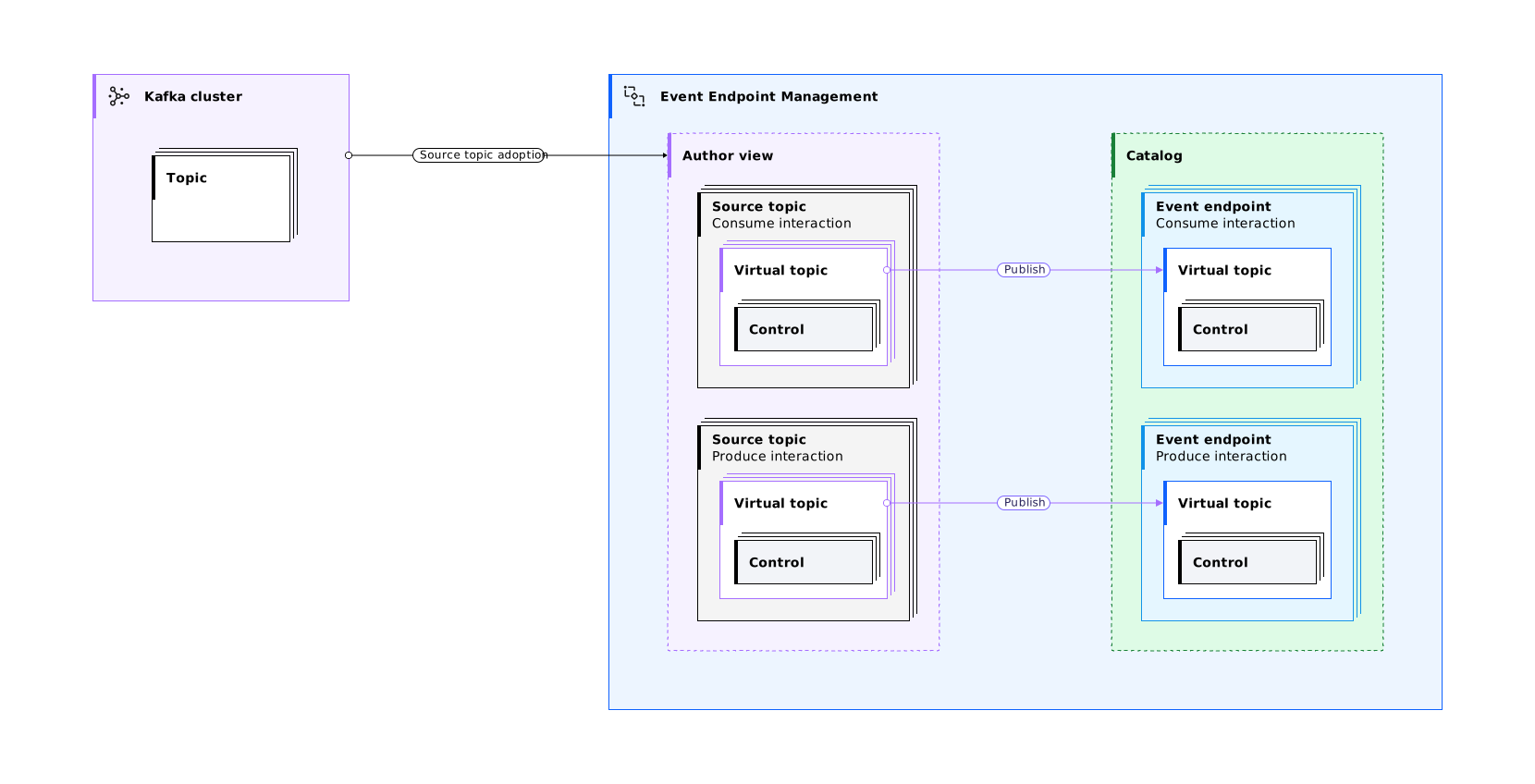
Read about the key concepts and terms that are used in Event Endpoint Management. The following diagram demonstrates how the key concepts work together.
Application
An application in Event Endpoint Management is set of credentials that can be used by one or more Kafka clients to access one or more virtual topics. When you want to provide access to a virtual topic, you create an application in the Event Endpoint Management UI, and then subscribe the application to the virtual topic.
Catalog
The catalog lists all published and archived virtual topics. Users in your organization can browse the virtual topics, and view their descriptions, schemas, tags, and other details. From the catalog, the user can subscribe to a published virtual topic through an application.
Authors can use the catalog to check what virtual topics are published.
Cluster
Kafka runs as a cluster of one or more servers (Kafka brokers). The load is balanced across the cluster by distributing it among the servers. The term cluster in this documentation refers exclusively to Kafka clusters.
Cluster maintainers
Cluster maintainers can edit and maintain cluster connection definitions for the clusters that they are assigned to. Cluster maintainers cannot add topics to Event Endpoint Management from the cluster, change the maintainers of the cluster, or delete the cluster.
Consume
A client can consume events from virtual topics that are created from consume-enabled source topics. The client subscribes to the virtual topic, and can then consume Kafka events from the virtual topic by using standard Kafka client libraries.
Controls
Controls that manage how the event data is accessed, presented, and processed can be added to your virtual topics.
The following types of controls are available: event data controls and security controls.
Event data controls
With event data controls, you can manage and modify the event data that is sent to or received from the virtual topic.
You can add the following event data controls to a consume-enabled virtual topic:
- Content filtering: Control which events are delivered to subscribers based on event data or subscriber data.
- Quota enforcement: Manage the rate at which data is consumed from your virtual topic.
- Redaction: Redact sensitive data from events.
- Schema filtering: Filter out events that do not comply with the AVRO or JSON schema that is defined for the virtual topic.
You can add the following event data controls to a produce-enabled virtual topic:
- Quota enforcement: Manage the rate at which data can be written to your virtual topic.
- Schema enforcement: Allow only events that comply with the AVRO or JSON schema that is defined for the virtual topic.
Security controls
With security controls, you can manage how the virtual topics are secured.
You can add the following security controls to both consume-enabled and produce-enabled virtual topics:
- Approval: Use the approval control to force users to request access to your virtual topic.
- Mutual TLS: Require users to present a valid client certificate that matches on common name and other specified subject fields.
- OAuth2: Require users to provide their OAuth2 credentials to access the virtual topic.
- SASL Credentials: Require users to provide their SASL credentials to access the virtual topic.
Event
An event represents a meaningful occurrence or change in the state of a system or a value. Find out more about key concepts related to Apache Kafka.
Event endpoint
Event endpoints refer to the published virtual topics that are available to Kafka clients through the Event Gateway.
Event Gateway
Access to virtual topics is managed by the Event Gateway. The Event Gateway handles the incoming requests from clients to access a virtual topic, routing traffic securely between the Kafka cluster and the client.
The Event Gateway is independent of your Kafka clusters, making access to topics possible without requiring any changes to your Kafka cluster configuration.
The following methods are available for deploying and managing your Event Gateway instances:
EventGatewaycustom resource managed by your Event Endpoint Management operator.- Standalone Event Gateway Docker container.
- Kubernetes Deployment.
Event Gateway group
An Event Gateway group is a logical group of Event Gateway instances, to which virtual topics are published.
Example gateway groupings:
- Event Gateways that are deployed to manage Kafka traffic to designated Kafka clusters.
- Event Gateways that are colocated within the same geographical area.
- Event Gateways that manage traffic for different Kafka topics that are at different stages of maturity. For example, development, test, or production.
When you deploy an Event Gateway, you must specify the gateway group that it belongs to.
When a new Event Gateway starts, it contacts the Event Manager, which responds with all the virtual topics that are published to the gateway’s group. Kafka clients can then access the published virtual topics through the new Event Gateway.
Key points:
- You must have at least one gateway group.
- An Event Gateway can be a member of only one gateway group.
Event Manager
An Event Endpoint Management deployment has the following components:
- One Event Manager instance. The Event Manager is where you define the Kafka clusters, topics, access controls, and other rules.
- One or more Event Gateway instances. The Event Gateways are located between the Kafka clusters and the clients, and apply the rules that you define in the Event Manager.
Event Manager instances are defined by the EventEndpointManagement custom resource type.
IBM API Connect Developer Portal
IBM API Connect Developer Portal is an external developer portal where you can publish virtual topics. When you publish virtual topics to Developer Portal, users can discover and subscribe to virtual topics through a unified interface that includes both synchronous and asynchronous APIs.
Message
The unit of data in Kafka. Each message is represented as a record, which comprises two parts: key and value. The key is commonly used for data about the message and the value is the body of the message. Message is also sometimes referred to as event data and record.
To learn more about key concepts, see the Apache Kafka documentation.
Owner
A user with the author role who can assign user groups to view virtual topics, edit source topics, and maintain clusters that they create.
Produce
A Kafka client can write events to a virtual topic that is published to the catalog. The client must subscribe to a virtual topic on a produce-enabled source topic, and then they can produce Kafka events to the virtual topic through the Event Gateway, by using standard Kafka client libraries.
Source topic
A source topic is a topic that is on a Kafka cluster, which you make available in Event Endpoint Management. For a single source topic, you can define one or more virtual topics that provide different security and event data controls for that source topic. Where there is no risk of ambiguity, the term topic is used to refer to a source topic in this documentation.
Subscription
A subscription is a set of credentials that can be used by a Kafka client to access the virtual topics that are included in an application.
Topic
A topic refers to a Kafka topic on a Kafka cluster. An Event Endpoint Management author adds topics from Kafka clusters, which can then be exposed to clients through an Event Gateway. Where there is a risk of ambiguity, topics are referred to as source topics in this documentation.
Topic editors
Topic editors can update source topic information and manage virtual topics for the source topics that they are assigned to. Topic editors cannot change the editors of the source topic or delete source topics.
User groups
A group of users that have access to specific actions such as viewing virtual topics, editing source topics, and maintaining clusters. User groups are defined by an external identity provider, and group membership is sent as part of the login process.
Virtual topic
A virtual topic represents a Kafka topic that the Event Endpoint Management administrator adds to Event Endpoint Management, and is available to be published to the Event Endpoint Management catalog. When you publish virtual topics to the Event Endpoint Management catalog, you make them available to the clients through an Event Gateway. A virtual topic is also referred to as an event endpoint from the Kafka client’s perspective.
Virtual topic viewers
Virtual topic viewers are a group of users that can view and subscribe to selected virtual topics in the catalog, in addition to existing public virtual topics. Users can view and subscribe to the virtual topics that are assigned to their user group.