
Flows#
A flow is an object used to store the execution flow of a data pipeline. It is composed of multiple stages, with each stage defining how data is handled at that part of the execution flow.
- The SDK provides the following functionality to interact with batch flows:
Creating a flow
Retrieving flows
Editing a flow
Updating a flow
Duplicating a flow
Deleting a flow
Compiling a flow
Auto-arranging a flow
Creating a Flow#
In the UI, you can create a flow by navigating to Assets -> New asset -> Transform and integrate data with Batch.
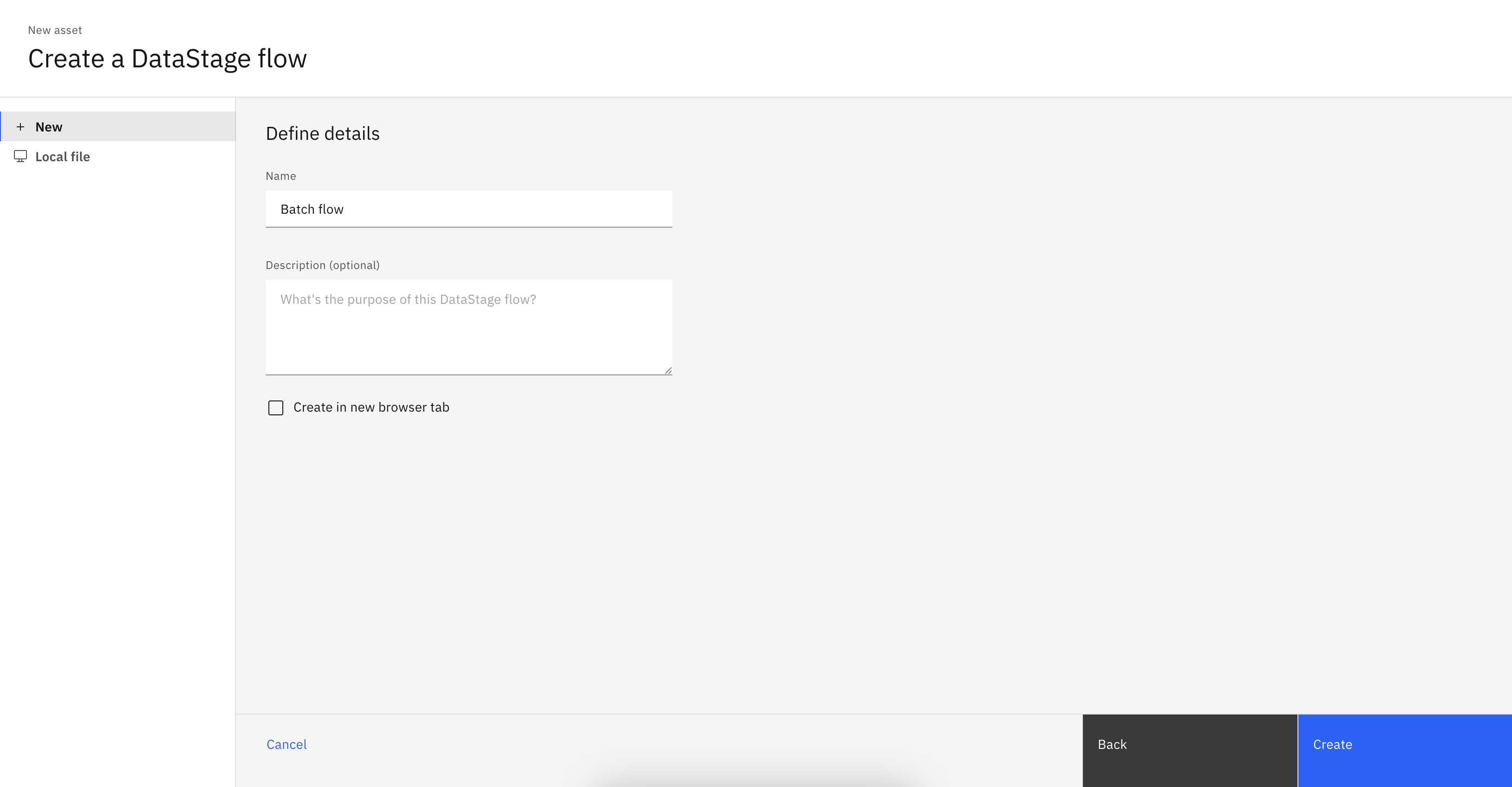
In the SDK, you can create a flow from a Project object using the
Project.create_flow() method.
You are required to supply a name parameter and an optional description parameter.
You must also specify a flow_type as 'batch'.
This method returns a BatchFlow instance.
>>> new_flow = project.create_flow(name='My batch flow', description='optional description', environment=None, flow_type='batch')
>>> new_flow
BatchFlow(..., name='My batch flow', description='optional description', flow_id=...)
Retrieving Flows#
Flows can be retrieved through a Project object using the
Project.flows property.
If you wish to only retrieve batch flows use the Project.flows.get_all() method to filter by flow_type.
You can also retrieve a single flow using the Project.flows.get() method which takes in unique identifiers such as the flow_id or name.
>>> project.flows  # a list of all the flows
[StreamingFlow(...), ...BatchFlow(...)...]
>>> project.flows.get_all(flow_type='batch')
[...BatchFlow(..., name='example batch flow', ...)...]
>>> project.flows.get(name='My batch flow')
BatchFlow(..., name='My batch flow', description='optional description', ...)
Editing a Flow#
You can edit a flow in multiple ways.
For starters, you can edit a flow’s attributes like name or description.
>>> new_flow.description = 'new description for the flow'
>>> new_flow
StreamingFlow(name='My first flow', description='new description for the flow', ...)
You can also edit any flow by editing its stages. This can include adding a stage, removing a stage, updating a stage’s configuration, or connecting a stage in a different way than before. All of these operations are covered in the Stages documentation (see Batch Stages or Streaming Stages).
Updating a Flow#
In the UI, you can update a flow by making changes to it and clicking the Save icon.

In the SDK, you can make changes to a Flow instance
in memory and update it by passing that object to the Project.update_flow() method.
This method returns an HTTP response indicating the status of the update operation.
>>> new_flow.name = 'new flow name'  # you can also update the stages, configuration, etc.
>>> project.update_flow(new_flow)
<Response [200]>
>>> new_flow
StreamingFlow(name='new flow name', description='new description for the flow', ...)
Duplicating a Flow#
To duplicate a flow using the SDK, pass a Flow instance
to the Project.duplicate_flow() method,
along with the name parameter for the new flow and an optional description parameter.
This duplicates the flow and returns a new instance of Flow.
>>> duplicated_flow = project.duplicate_flow(new_flow, name='duplicated flow', description='duplicated flow description')
>>> duplicated_flow
StreamsetsFlow(name='duplicated flow', description='duplicated flow description', ...)
Deleting a Flow#
To delete a flow in the UI, go to Assets, choose a flow, click the three dots next to it, and select Delete.
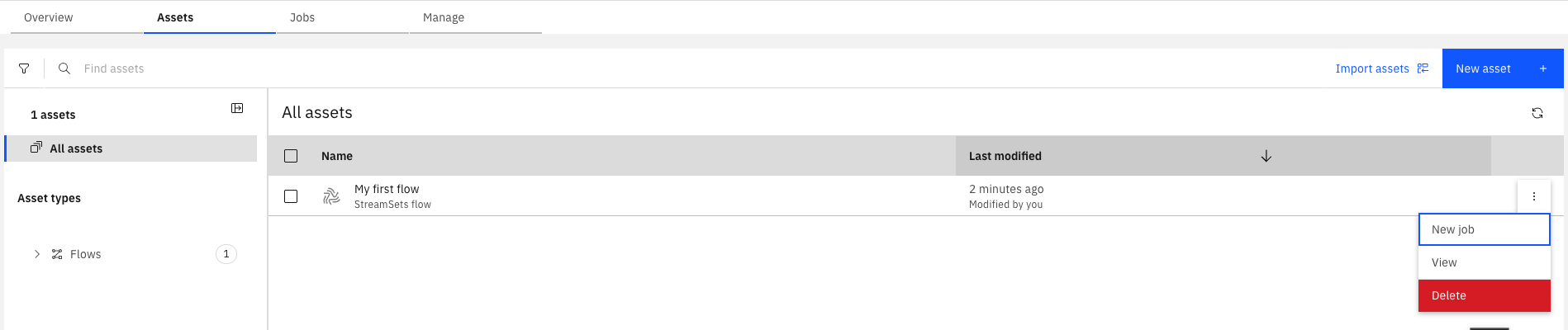
To delete a flow using the SDK, pass a Flow instance to the Project.delete_flow() method.
This method returns an HTTP response indicating the status of the delete operation.
>>> project.delete_flow(duplicated_flow)
<Response [204]>
Compiling a Flow#
In the UI, you can compile a batch flow by hitting the ‘Compile’ icon to compile the flow. Compiling is required before running a flow, so pressing the ‘Run’ icon in the UI will automatically compile first.

Because of this UI behavior, in the SDK, creating a job from a batch flow will automatically compile the flow for you.
However, if you wish to just compile a flow without creating or running a job for it, you can still call the BatchFlow.compile() method.
This will return an HTTP response indicating the status of the compile operation.
Auto-Arranging a Flow#
In the UI, stages in a flow can be manually positioned by dragging them around the canvas. However, when creating flows programmatically or when a flow becomes cluttered, you may want to automatically arrange the stages in a clean, organized layout.
By default, flows are automatically arranged when updated. This behavior can be controlled using the BatchFlow.use_auto_arrange() method.
Automatic Arrangement (Default Behavior)#
When you create a new flow, automatic arrangement is enabled by default. This means stages will be automatically positioned based on their stages and links whenever the flow is updated:
>>> # Create a flow - auto-arrange is enabled by default
>>> batch_flow_auto = project.create_flow(name='My auto arranged flow', flow_type='batch')
>>> # ... add stages and links ...
>>>
>>> # When you update, stages are automatically arranged
>>> project.update_flow(batch_flow_auto)
<Response [201]>
Disabling Automatic Arrangement#
If you want to preserve the exact positioning of stages in an existing flow, you can disable automatic arrangement. This is useful when you’ve manually positioned stages in the UI and want to maintain that layout when making programmatic changes:
>>> # Get an existing flow and disable auto-arrange
>>> batch_flow_auto = project.flows.get(name='My auto arranged flow')
>>> batch_flow_auto.use_auto_arrange(False)
BatchFlow(...)
>>> # ... add stages and links ...
>>>
>>> # When you update, the original stage positions are preserved
>>> project.update_flow(batch_flow_auto)
<Response [201]>
Note
When auto-arrange is disabled, newly added stages may not be positioned optimally relative to existing stages. You may need to manually position them in the UI or call auto_arrange() once to establish a clean layout.
Manual Arrangement#
You can also manually trigger arrangement at any time using the BatchFlow.auto_arrange() method:
>>> # Manually arrange stages at any time
>>> batch_flow_auto.auto_arrange()
>>>
>>> # Update the flow with the new layout
>>> project.update_flow(batch_flow_auto)
<Response [201]>
This is particularly useful when:
Creating flows programmatically where manual positioning is not practical
Cleaning up flows that have become cluttered over time
Standardizing the layout of multiple similar flows
Importing flows that may have inconsistent positioning
Note
The actual layout calculation happens when the flow is updated or visualized. The auto_arrange() method removes existing position data to trigger the automatic arrangement, while use_auto_arrange() controls whether this happens automatically on every update.
Setting Runtime Parameters of a Flow#
In the UI, you can set the runtime parameters of a flow by clicking the settings button and going to the runtime parameters tab. This tab appears only if the flow has a local parameter or is using a parameter set. In this tab, you can choose which value set to use for your parameter sets or change the values of specific parameters.
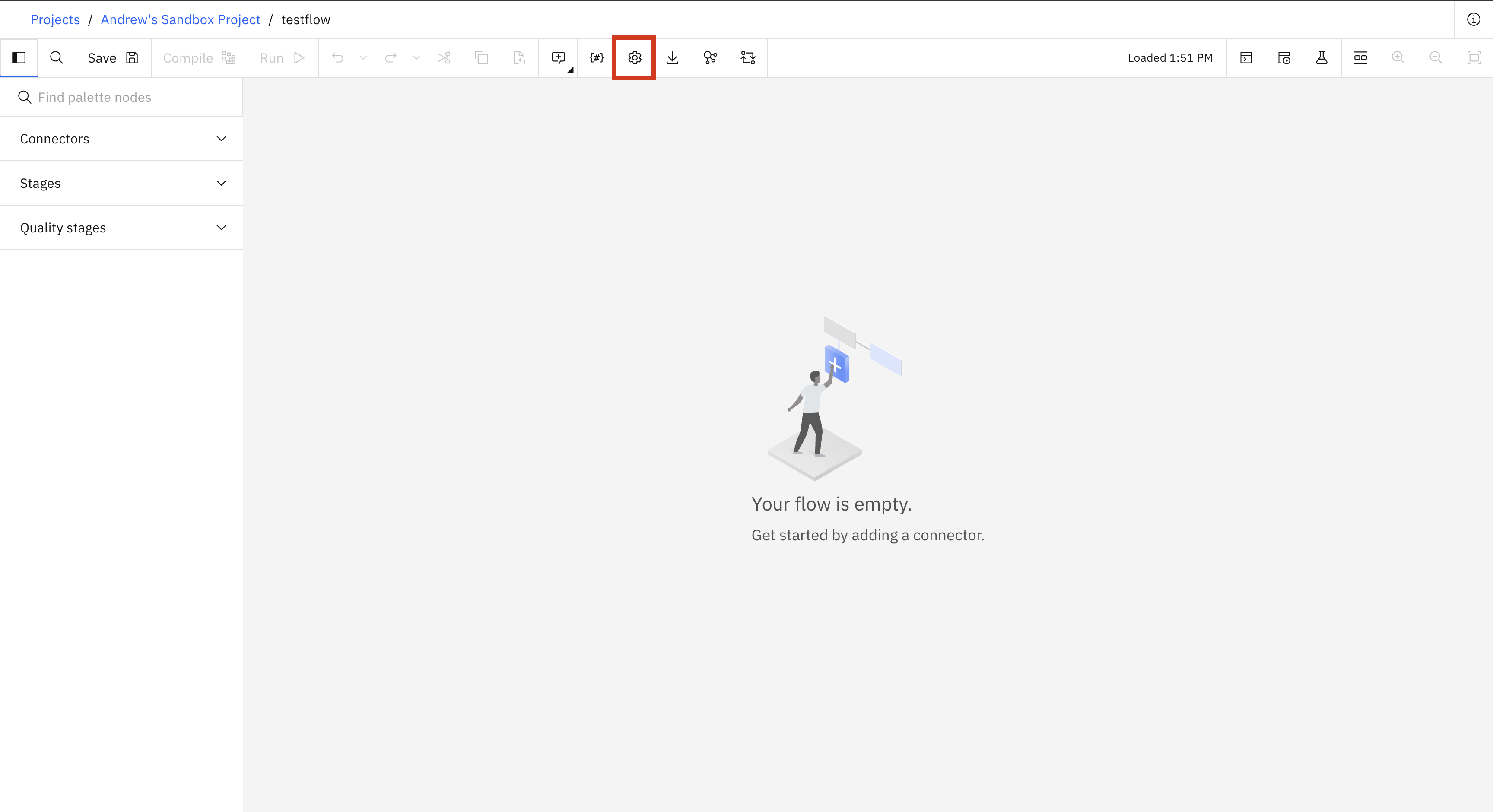
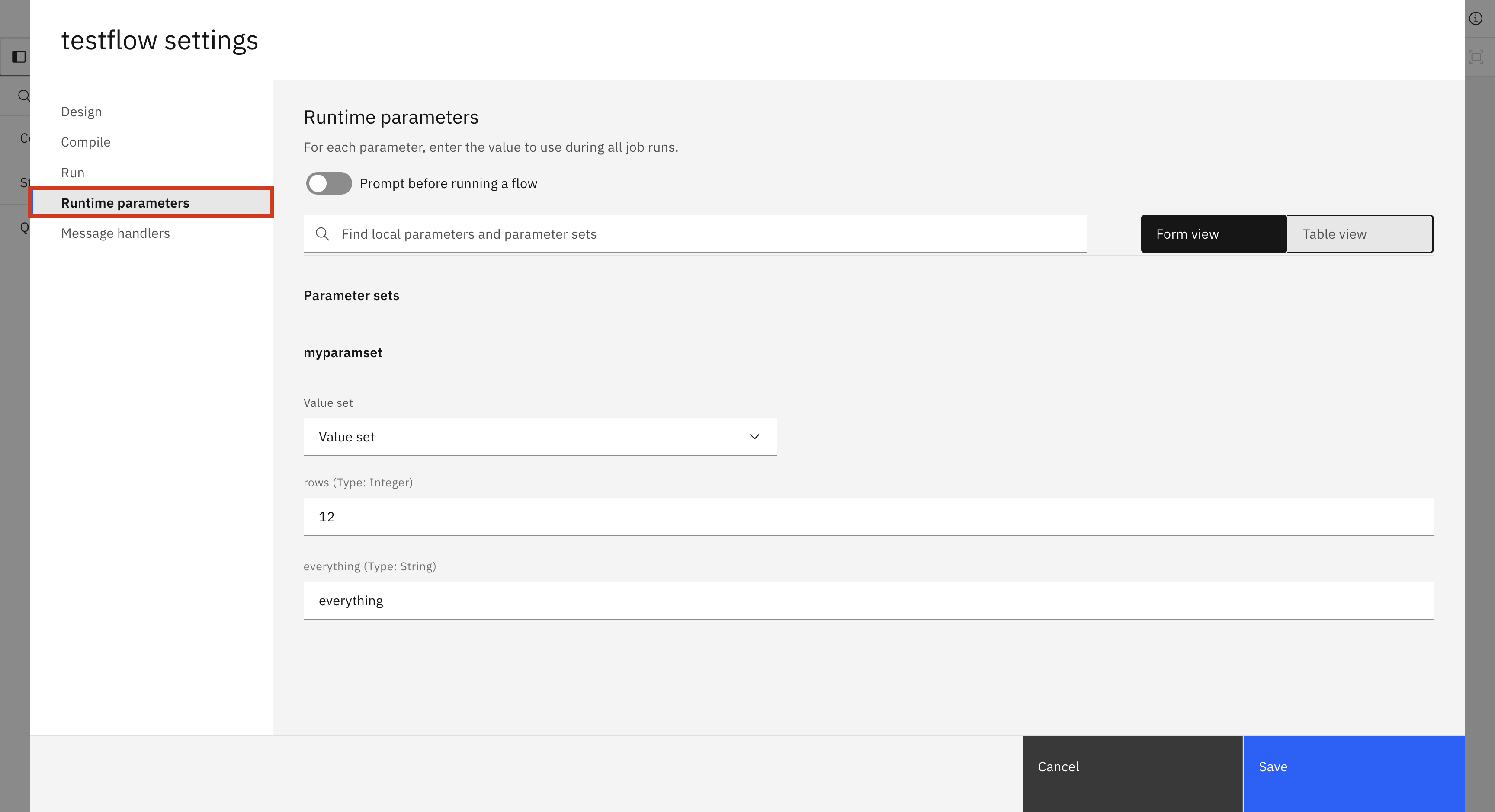
In the SDK, there are a few different methods for changing runtime parameters.
BatchFlow.set_runtime_value_set() takes in the parameter_set_name and the value_set_name you want to use for that parameter set.
BatchFlow.set_runtime_parameter_value() takes in the parameter_set_name, the parameter_name, and the value you wish to set that parameter to.
BatchFlow.set_runtime_local_parameter() takes in the local_parameter_name and the value you wish to set it to.
>>> # batch_flow_with_parameters is a batch flow that uses a parameter set named myparamset and a local variable named localparam1
>>> batch_flow_with_parameters.set_runtime_value_set(parameter_set_name='myparamset', value_set_name='value_set_1')
>>> batch_flow_with_parameters.set_runtime_parameter_value(parameter_set_name='myparamset', parameter_name='param1', value='default')
>>> batch_flow_with_parameters.set_runtime_local_parameter(local_parameter_name='localparam1', value='random')
Warning
Changes to runtime parameters may not appear in the UI. If you are strictly using the SDK, this will not be a problem.
Setting Runtime Settings of a Flow#
In the same settings window mentioned in the previous section, there is another tab called Run. In this tab there are runtime settings that you can change for a flow. There is also an NLS and Format tab but these are not implemented in the SDK yet. These settings include the environment for the flow, the warning limit, and the max job retention. These settings (along with the runtime parameters) can also be changed per job, which is explained in this section: Editing Runtime Settings.
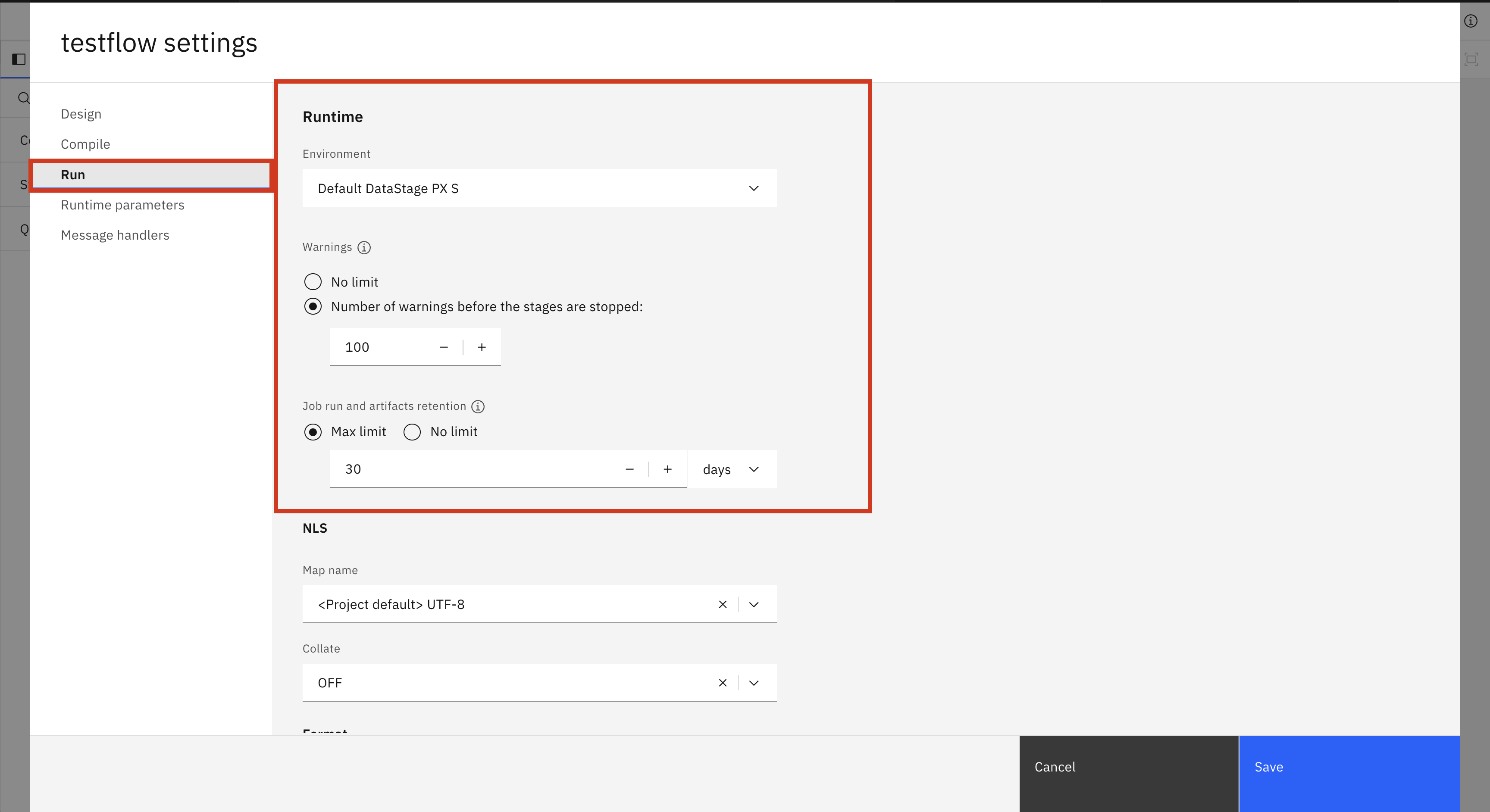
In the SDK, you can change the runtime settings of a flow by directly editing the configuration property of a BatchFlow. There are four different fields you can change.
environment: The internal name of the batch environment to use. To find the internal name of a batch environment you can either list all internal names withlist_batch_environments()or callget_batch_environment()with the display name.warn_limit: The number of warnings before the stages are stopped. Takes anintgreater than 0 or None for no limit.retention_days: The number of days to keep a job run. Cannot be set ifretention_amountis also set. Takes anintgreater than 0 or None for no limit.retention_amount: The number of job runs to keep in total. Cannot be set ifretention_daysis also set. Takes anintgreater than 0 or None for no limit.
>>> batch_flow.configuration.environment='default_datastage_px'
>>> batch_flow.configuration.warn_limit=20
>>> batch_flow.configuration.retention_days=15
Warning
Changes to runtime settings may not appear in the UI. If you are strictly using the SDK, this will not be a problem.
Exporting Flows#
To export a flow using the SDK, call the Project.export_flow() method
and pass an individual Flow object. If you want to
export multiple flows at the same time, call the Project.export_flows()
method and pass a list of Flow objects.
Note
When using Project.export_flows()
to export multiple flows at once, all objects in the list must be of the same type. You cannot
pass a list containing both StreamingFlow and
BatchFlow objects. It must contain one type or the other.
- You can set the following additional parameters:
with_plain_text_credentials– export credentials in plain text. (only relevant to streaming flows)destination– specify the export location.stream– stream the ZIP file data.
The function returns the location where the exported ZIP file was written.
>>> flow
StreamingFlow(name='My streaming flow', description='optional description', ...)

>>> project.export_flow(flow=flow)
PosixPath('flows.zip')
Importing Flows#
Note
Importing flows is only supported for batch flows.
To import a flow via the SDK using a zip file, you need to call the Project.import_flows() method and you
must specify the source parameter, which is the path to the ZIP file containing the JSON file or files for the batch flow or flows to be imported, and the type parameter, which should be
'batch'.
You can also specify the following parameters to configure the import to better fit your needs:
'on_failure'– Option for error handling during import. SeeBatchImportOnFailurefor available options.
'conflict_resolution'– Option for handling conflict resolutions during import. SeeBatchImportConflictResolutionfor available options.
'import_only'– If true, will only import the batch flows and will not compile them.
'include_dependencies'– If true, will not also import dependencies that the flow(s) have in the import file.
'replace_mode'– Option for replace mode method when conflict resolution is set to'replace'. SeeBatchImportReplaceModefor available options.
'import_binaries'– If set to true, will also import compiled binaries found in the zip file.
'wait'– Specified wait period. See below for more details.
The function will return a BatchImportResponse
object which will contain information about the import request. It is important to note that importing batch flows is an
asynchronous action, meaning that once you have received the response object the import might not be finished. The wait
parameter allows you to manage this in different ways depending on its value:
-1: The default option, which will wait until the import reaches a terminal status (COMPLETEDorCANCELLED).
>0: Time, in seconds, to wait for the import to finish.
Noneor0: No wait time, will return immediately.
Note
When using wait=-1, always check response.status after the call returns — a CANCELLED status indicates
the import service terminated the import autonomously (for example, due to resource constraints). Only a COMPLETED
status guarantees all flows were processed.
>>> # wait until import has completed
>>> response = project.import_flows(type='batch', source='flows_to_import.zip', wait=-1)
>>> response.status
BatchImportStatus.COMPLETED

>>> # no wait time
>>> response = project.import_flows(type='batch', source='flows_to_import.zip', wait=None)
>>> response.status
BatchImportStatus.STARTED

>>> # wait for 10 seconds
>>> response = project.import_flows(type='batch', source='flows_to_import.zip', wait=10)
>>> response.status
BatchImportStatus.IN_PROGRESS
The import’s status can be confirmed by the BatchImportResponse.status
field. If the import is not completed and you would like to get the latest status, you can use the
BatchImportResponse.refresh()
method.
>>> # no wait time
>>> response = project.import_flows(type='batch', source='flows_to_import.zip', wait=None)
>>> response.status
BatchImportStatus.STARTED

>>> time.sleep(100) # with the assumption the import will be complete
>>> response = response.refresh()
>>> response.status
BatchImportStatus.COMPLETED
Lastly, you can retrieve the list of imported flows from the
BatchImportResponse.imported_flows()
method, which will return an iterator of BatchFlow
objects. You can specify the optional parameter load=True to retrieve the DAGs for each of the flows.
Otherwise, the BatchFlow objects
that are returned will only have the flow_id and name fields populated.
>>> # no wait time
>>> response = project.import_flows(type='batch', source='flows_to_import.zip', wait=-1)
>>> response.status
BatchImportStatus.STARTED

>>> response.imported_flows()
<list_iterator object at 0x107385960>
Importing Flows from an ISX File#
In addition to zip files, batch flows can be imported from a legacy ISX export file. ISX is the legacy format
used for exporting DataStage assets. The same
Project.import_flows() method is
used: when the source file has an .isx extension, the file is uploaded to the DataStage migration service, which
converts the legacy job designs into batch flows in your project. The conversion happens entirely on the server, so the
same result is produced as when uploading the ISX file through the UI.
Note
Make sure that the ISX file export includes any dependencies, such as parameter sets and table definitions.
The on_failure, conflict_resolution, import_only, and wait parameters behave the same as for zip
imports. The include_dependencies, replace_mode, and import_binaries parameters only apply to zip imports
and are ignored for ISX imports.
Additional migration options can be provided through the isx_options parameter using an
IsxImportOptions object.
Any option left unset is omitted from the request, in which case the migration service default is used.
>>> # wait until the migration has completed
>>> response = project.import_flows(type='batch', source='legacy_jobs.isx', wait=-1)
>>> response.status
BatchImportStatus.COMPLETED

>>> # provide additional migration options
>>> from ibm_watsonx_data_integration.services.datastage.models.import_response_model import IsxImportOptions
>>> options = IsxImportOptions(create_missing_parameters=True, enable_platform_connection=True)
>>> response = project.import_flows(type='batch', source='legacy_jobs.isx', isx_options=options, wait=-1)
The returned BatchImportResponse
behaves the same as for zip imports: use
BatchImportResponse.refresh()
to poll the migration status and
BatchImportResponse.imported_flows()
to retrieve the converted flows. An in-progress ISX import can also be cancelled with
BatchImportResponse.cancel().