
Stages#
A stage is a part of a flow that is responsible for processing the flow’s data in a single, simple way. By connecting multiple stages together, you can perform more complex tasks.
- The SDK provides many ways to interact with a flow and its stages:
Adding a stage to a flow
Connecting stages
Editing a stage’s configuration
Listing and Retrieving Stages in a Flow#
To list all the stages in a flow, you can use the BatchFlow.stages property. This returns a list of StageNode instances.
>>> batch_flow.stages
[RowGeneratorStage(label='Row_Generator'), PeekStage(label='Peek'), RowGeneratorStage(label='Row_Generator_2'), PeekStage(label='Peek_2')]
If you want to filter these stages using arguments, you can use the Stages.get_all() method.
These arguments can be any of the fields found in the configurations of the stages you want, such as the stage type or output_count.
>>> batch_flow.stages.get_all(type="Row Generator")
[RowGeneratorStage(label='Row_Generator'), RowGeneratorStage(label='Row_Generator_2')]
Finally, to retrieve a specific stage from a flow, use the Stages.get() method.
The label of a stage is a unique identifier, so you can pass this value to find the desired stage.
>>> batch_flow.stages.get(label="Row_Generator")
RowGeneratorStage(label='Row_Generator')
Adding a Stage to a Flow#
To add stages to a flow in the UI, open the dropdown menu on the left side of the flow edit page and select the stage you want to add.
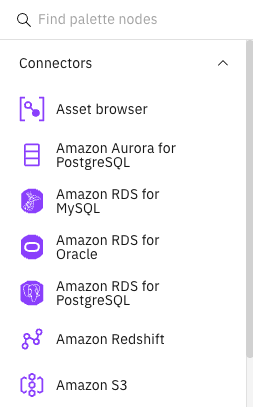
In the SDK, you can use the BatchFlow.add_stage() method.
This method takes the stage’s official type and its label. The type is the unique identifier for that stage, and the label is the name you want to give it.
This method returns the newly created stage.
>>> amazon_rds = batch_flow.add_stage(type='Amazon RDS for PostgreSQL', label='Amazon RDS')
>>> project.update_flow(batch_flow)
<Response [201]>
You can find a list of all unique identifiers here: BatchFlow.add_stage()
Alternative: Using BatchStageInfo
You can also add stages using a BatchStageInfo object from the BatchFlow.available_stages property.
This approach is useful when you want to discover and add stages programmatically.
>>> # Get available stages
>>> available_stages = batch_flow.available_stages
>>>
>>> # Find a specific stage by name
>>> postgres_stage_info = available_stages.get(name='Amazon RDS for PostgreSQL')
>>>
>>> # Add the stage using stage_info
>>> amazon_rds = batch_flow.add_stage(stage_info=postgres_stage_info, label='Amazon RDS')
>>> project.update_flow(batch_flow)
<Response [201]>
This approach provides better type safety and allows you to explore available stages before adding them to your flow.
Remove a Stage from a Flow#
In the UI, you can click the three dots at the top right of the stage and then click the delete button in the menu.
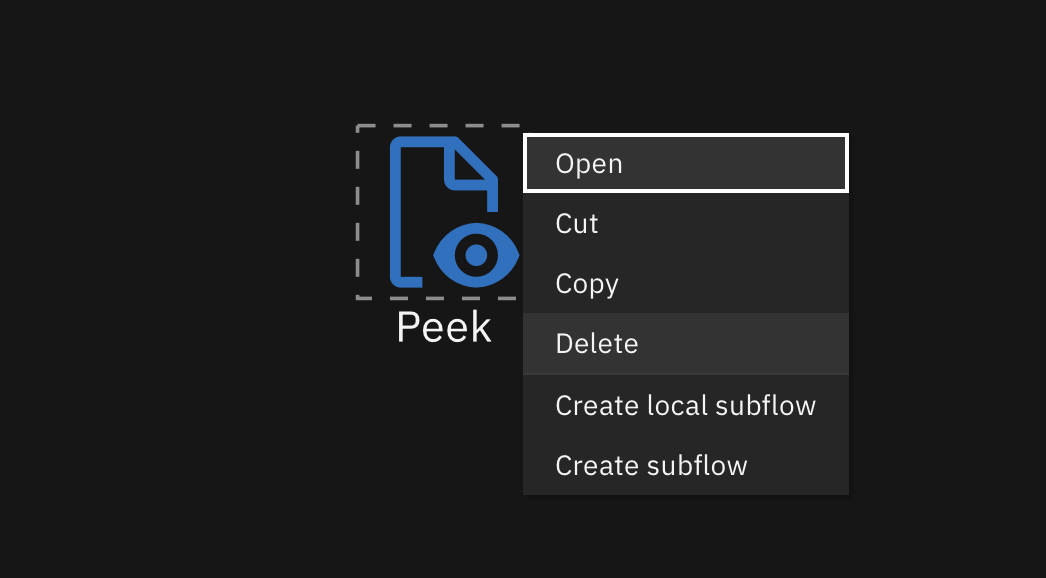
In the SDK, you can remove a stage from a flow using the BatchFlow.remove_stage() method
and passing it an instance of StageNode.
All stages connected to this stage will be disconnected by this action.
This method does not return anything.
After removing stages, you need to call the Project.update_flow() method to save the changes.
>>> amazon_sqs_consumer = batch_flow.stages.get(label="Amazon RDS")
>>> batch_flow.remove_stage(amazon_sqs_consumer)
>>> project.update_flow(batch_flow)
<Response [201]>
Listing all Links connected to a Stage#
In the SDK, you can list all links connected to a stage by using the StageNode.get_input_links() and StageNode.get_output_links() methods.
batch_flow currently has a Row Generator stage connected to a Peek stage.
>>> Row_Generator_Stage = batch_flow.stages.get(label="Row_Generator")
>>> Row_Generator_Stage.get_output_links()
[Link_1 (src='Row_Generator', dest='Peek')]
>>> Peek_Stage = batch_flow.stages.get(label="Peek")
>>> Peek_Stage.get_input_links()
[Link_1 (src='Row_Generator', dest='Peek')]
Connecting Stages#
In the UI, to connect stages, you can click on the output of a stage and drag it to another stage.
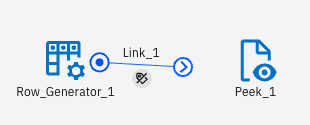
In the SDK, you can connect batch stages by using the Stage.connect_output_to() method.
This method connects two stages and returns the link created between them.
>>> row_gen = batch_flow.add_stage('Row Generator', 'Row_Generator') # a sample origin stage that generates data
>>> peek = batch_flow.add_stage('Peek', 'Peek') # a sample destination stage that outputs all input to console
>>> link = row_gen.connect_output_to(peek)
Editing a Stage’s Configuration#
All stages have configurable properties.
You can edit a stage’s configuration through its corresponding configuration property.
This property returns an object containing all of that stage’s properties. The configuration object supports both dot notation and bracket notation for editing.
>>> row_gen.configuration
{
    "buf_mode": "default",
    "max_mem_buf_size": 3145728,
    ...
    "runtime_column_propagation": null,
    ...
    "records": 10,
    ...
}
>>> row_gen.configuration.records = 5
>>> row_gen.configuration["runtime_column_propagation"] = False
Adding Comments and Annotations#
You can add comments and annotations to a flow by using the BatchFlow.add_markdown_comment() and BatchFlow.add_annotation() methods.
A MarkdownComment can take Markdown strings to customize your text, and an Annotation has several configurable fields. These fields include bold, italics, font, text_decoration, background_color, text_color, vertical_align, horizontal_align, text_size, and outline.
You can also connect comments and annotations to stages. When the flow is generated, the stages will be surrounded by their connected comments and annotations.
>>> annotation = batch_flow.add_annotation("New Annotation")
>>> annotation.bold = True
>>> annotation.italics = True
>>> annotation.font = "font-arial"
>>> annotation.text_decoration = "underline"
>>> annotation.background_color = "#1192E8"
>>> annotation.text_color = "#DA1E28"
>>> annotation.horizontal_align = "align-middle"
>>> annotation.vertical_align = "align-center"
>>> annotation.text_size = 18
>>> annotation.connect_to(row_gen)
>>> annotation.connect_to(peek)