MODULE 2 | DELEGATE
THE AGENTIC SIDEBAR
i. From assistant to partner
In the previous Assist module, you engaged with IBM Bob in its most "manual" and "hands-on" form: it finished lines of code for you, predicted the next set of edits to be performed, and made surgical changes (with your approval) sequentially throughout a codebase. From the end-user (your) perspective, the experience thus far has felt closely watched and tightly chaperoned. Every action Bob has taken has been directly instrumented by you, or at the very least required your direct sign-off at every step in the sequence, to ensure no changes were made to the code base without your expressed permission.
AI MATURITY CURVE
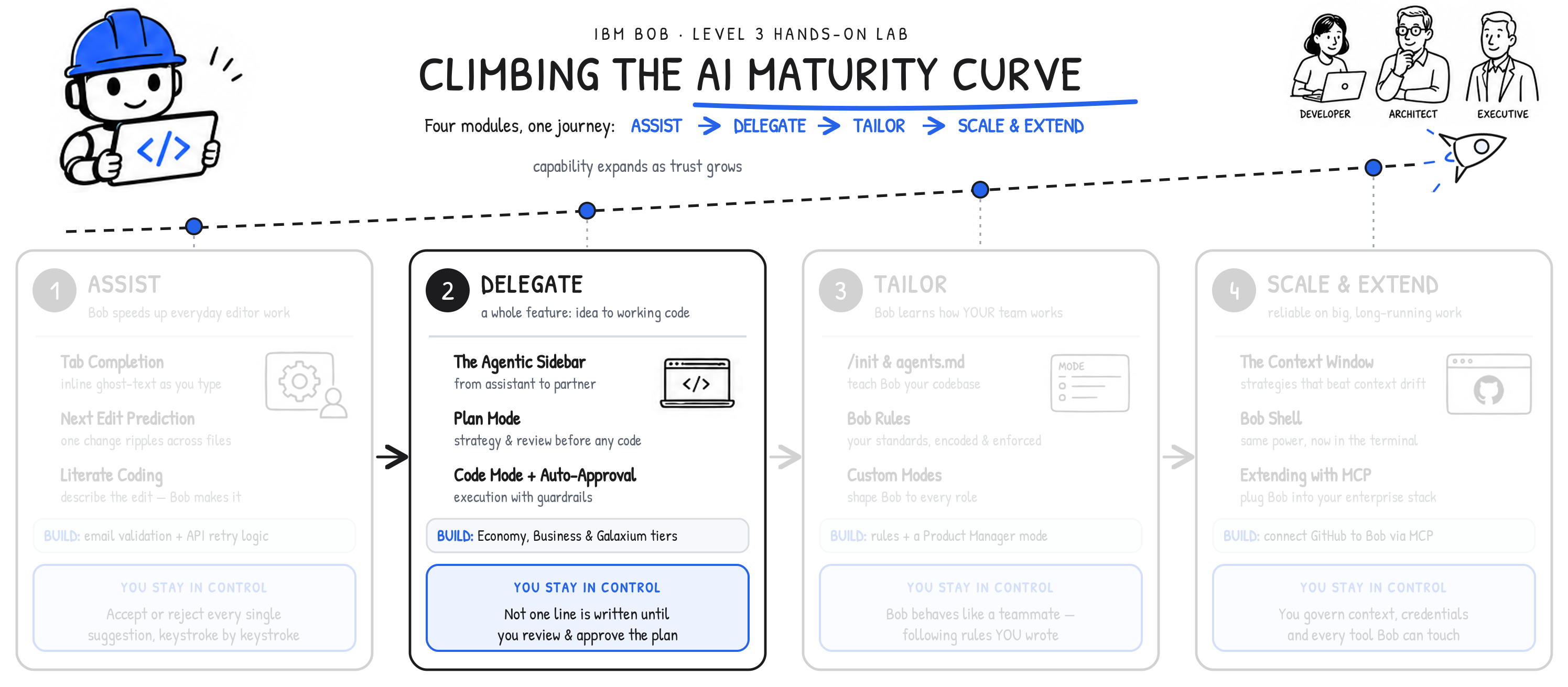
This makes sense when viewed through the lens of the AI Maturity Curve that was discussed previously. Where you are currently in your journey with IBM Bob— progressing from the nascent Assist stage on the left-most portion of the curve, moving further to the right into the Delegate phase —is at a point where trust in the AI technology should be low. Coordinating code changes with IBM Bob with a healthy degree of skepticism is a valid way to safely vet the AI partner's capabilities, build trust in its ability to deliver the results you seek, and gradually begin delegating more responsibility to that agent.
The Delegate module ahead raises those stakes considerably and asks for a much higher degree of trust on the user's (your) part. The work ahead will transform your perspective of IBM Bob from an assistant into a trusted partner. To earn that trust, Bob will demonstrate taking an entire feature of the Galaxium travel app— one that spans the frontend, the backend, and the database —and shephard it from idea to working code, largely on its own.
The reason delegation of this magnitude remains safe— and why you should feel confident in demonstrating this to even a cautious or skeptical prospective enterprise audience —is the core discipline of IBM Bob that was introduced earlier, and will be reinforced here: Bob builds only what you have reviewed and approved in a plan first. Human control does not degrade as the stakes rise. Control remains anchored from the start of the process and at the onset of the AI Maturity Curve, with the plan of execution you establish for Bob, your AI partner.
ii. Why this matters
All work you have performed across the hands-on lab so far has been inline coding modifications: IBM Bob performing work at the exact spot your cursor sits. Bob's Agentic Sidebar functionality is a different proposition altogether. It is the primary interface for complex, multi-step work. It also enables Bob to:
- Read through files
- Reason across entire codebases
- Ask clarifying questions in follow-up to user prompts
- Implement a requested feature end-to-end.
iii. The Agentic Sidebar
Unlike the Literate Coding functionality that was showcased in the previous module (which required your direct input - keystroke by keystroke), the Agentic Sidebar allows you hand over and delegate entire objectives (and very complex workflows) with a single request. It is the most productive way to work with Bob. The point at which you have sufficient trust and confidence in Bob to faithfully execute this work is where the AI partnership truly begins, further progressing you along the AI Maturity Curve journey.
UNDERSTANDING THE VARIOUS MODES
The agentic sidebar offers several modes, each tuned for a specific phase of development and code lifecycle management.
| MODE | PURPOSE |
|---|---|
| Plan Mode | Design, architecture, technical specifications, and breaking down problems into sequential workflows — all performed without making any code changes. |
| Agent Mode | Writing, modifying, and refactoring code; implementation of new features; and fixing bugs. This mode will actively make code changes (with your approval.) |
| Ask Mode | A read-only, explanation-focused mode best suited for understanding code, answering questions, and performing analysis without making any code changes. |
IBM BOB v2.0
Previous versions (before the release of v2.0) offered a Code mode and Advanced mode — these two have now been consolidated into a single Agent mode, which covers all code writing and modification work within a single mode. The Ask mode is a brand new addition post-v2.0 with features and capabilities that are still under development at the time of this publication.
iv. Plan Mode
THINK BEFORE BUILDING
Plan mode is the starting point for any feature or architectural change of consequence. In this mode Bob has read-only access to the codebase — it cannot change anything — and its sole job is to produce a detailed plan before a single line of code is written. Reach for it whenever a change touches multiple files or layers, when you are designing new components or data models, or when you simply want to understand the scope of a change before committing to it.
Entering it is straightforward: open the agentic sidebar in VS Code, select Plan from the mode selector, and describe the feature in natural language. From there, Bob reads the relevant files to understand the existing structure, asks clarifying questions to resolve ambiguity before planning, and then generates planning documents — typically two: an implementation plan (a detailed specification of what the feature does, how it will be built, how it will be tested, and how it should behave — often 100 to 200-plus lines) and an architecture plan (a higher-level account of structural decisions, component interactions, and data flow). These documents are saved to the project and become the authoritative specification for the build.
v. Review and Plan
A DEVELOPER'S RESPONSIBILITY
The review and planning process is at the core of everything you (the user) performs with the service. The plans that IBM Bob generates are not loose suggestions — they are exactly what Bob will build, verbatim. Approving a plan you have not adequately reviewed or read ahead of time will hand full responsibility for any misaligned or incorrect implementation squarely to you. Bob, as they say, was only following orders.
Before you proceed with delegating tasks to Bob, it's imperative that you read both the implementation plan and the architecture plan in full. Verify that the described behavior matches the feature you intended. Confirm that the testing requirements make sense. Correct any misunderstanding now, by revising your prompt or asking a follow-up, while correction is cheap (and far less costly a fix than after post-implementation.)
RESPONSIBILITY AS A DEVELOPER AND END-USER
Read the plans. To re-emphasize (and this is true across all LLMs): human-in-the-loop review is the single most important quality gate in any agentic workflow. The quality of the final implementation is directly tied to the quality of the plan you approve.
vi. Agent Mode
IMPLEMENT APPROVED PLANS
In Agent mode, Bob has full access to file operations and command execution. It can create, modify, and run code across an entire codebase.
Once the plan is reviewed and approved, the implementation happens within a new conversation. That detail is not incidental. Starting fresh clears Bob's context window, which keeps the implementation focused, prevents the earlier planning discussion from eating into the token budget, and reduces the chance of Bob conflating strategizing plans with implementing instructions. To carry the specification into the new conversation, you will need to reference the planning documents with context mentions.
For example, the following two paths specify contextual details about a (hypothethical) implementation and architecture plan.
The process for "switching" into Agent mode is straightforward and simple— and you'll have the opportunity to practice this yourself in the following hands-on steps —but for shorthand reference:
- Open the Agentic Sidebar
- Select Agent from the mode selector
- Optionally reference any relevant planning documents or context with
@/path/to/file - Send the implementation request to Bob, which will carry out the task
vii. Auto-Approval
CONTROL, DIALED TO TASTE
By default, Bob will ask for permission before performing consequential actions such as writing files, running Terminal commands, or executing tests. The auto-approval setting governs whether those actions proceed automatically or pause for your review, with various configurations you can set to determine the level of autonomy (and trust) you are comfortable delegating to Bob.
| Setting | Behavior | When to use |
|---|---|---|
| Manual approval | Every action requires explicit confirmation | Sensitive codebases, unfamiliar tasks |
| Auto-approve | Bob proceeds without interruption | Controlled demos, trusted environments |
| Hybrid | Auto-approve low-risk actions; prompt for riskier ones | Day-to-day development |
The convenience of full auto-approval comes at the trade-off of escalating exposure risk. If autonomy is dialed up to the highest degree, Bob will be able to run arbitrary Terminal commands without human review — reducing the management overhead on human users, but potentially introducing mistakes into a plan that can propagate unchecked. For most work, a hybrid and balanced posture is the sensible default — auto-approve file reads and writes, but require confirmation before command execution.
AUTO-APPROVE PERMISSIONS
Set auto-approval in Bob's settings panel according to the sensitivity of the project and the trust you place in the approved plan.
Auto-approve Permissions can be set for specific functions and features, including: Read, Edit, Execute, MCP, Skill, Todo, Subtask, Subagent, and Mode switching.
viii. Referencing files
CONTEXTUALIZED MENTIONS
When you point Bob at files in the sidebar, use context mentions rather than copying and pasting their contents:
| Mention syntax | Effect |
|---|---|
| @/path/to/file.js | Includes the full contents of a specific file |
| @/path/to/folder | Includes all files within a directory |
| @problems | Includes current VS Code Problems panel diagnostics |
| @terminal | Includes recent terminal output |
Mentions are resolved at the moment you send the message, giving Bob precise, targeted information without burning context on unrelated files.
ix. Key takeaways
- IBM Bob's Agentic Sidebar is the service's most capable interface for complex, multi-file features.
- Always begin substantial work in Plan mode to define a specification before any code is written.
- Read the generated plans in full, as these define exactly what Bob will build.
- Start a new conversation before switching to Agent mode, to keep the context window clean and focused.
- Use context mentions (
@/path/to/file) to carry the planning documents into the implementation conversation. - Set auto-approval deliberately, according to the sensitivity of the project and the complexity of the task.
- Plan → review → new conversation → Agent is the standard pattern for feature development with Bob and a discipline that ensures AI delegation remains safe.
In the following section, you will apply this deeper understanding of the agentic sidebar using Bob to further enrich the Galaxium Travels application.