MODULE 4 | SCALE & EXTEND
EXTENDING WITH MCP
i. Connecting everything back to Bob
The Model Context Protocol (MCP) is what connects IBM Bob to the rest of your business and the systems your organization spans: a standardized interface that lets LLM-powered applications reach external tools, services, and data sources through one consistent integration layer. Any external service that can provide an MCP server can potentially serve as another endpoint for Bob to work with. This is the final (and most consequential) step in scaling Bob across an enterprise- making Bob a participant in the systems your teams already use —and serves as an effective capstone to the work you've performed thus far.
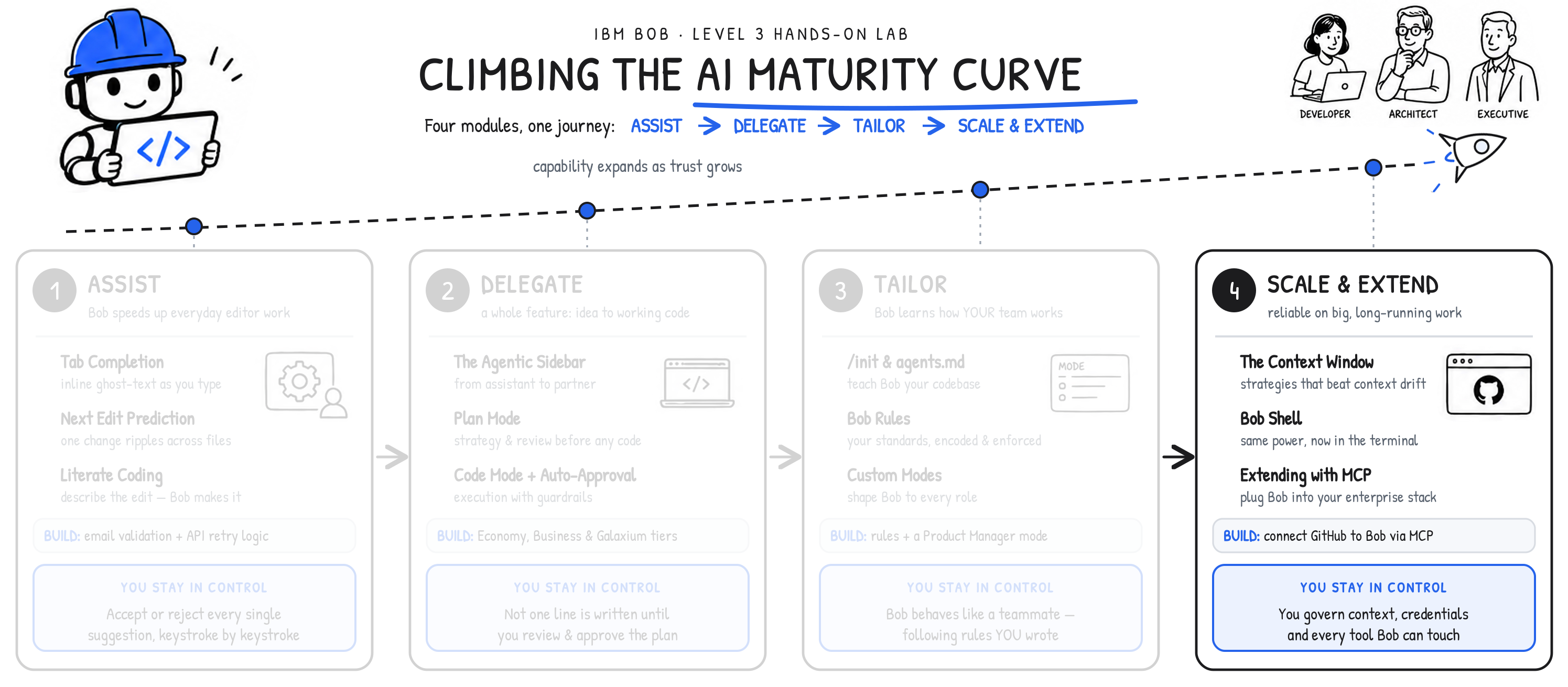
THE FULL JOURNEY ALONG THE AI MATURITY CURVE
This final module completes your journey along the AI Maturity Curve. Before continuing on, step back and look at the shape of what you've done: - You began with Bob finishing your lines and predicting your next edit (Module 1 | Assist) - You handed Bob whole features to build from an approved plan (Module 2 | Delegate) - You taught Bob about your project structure and your organization's standards, reinforcing that learning until Bob behaved like a teammate (Module 3 | Tailor) - Finally, you made Made reliable at scale and connected to the systems your enterprise already runs (Module 4 | Scale & Extend)
A common thread across all of these modules and discussions has been the core value that the developer stays in control. Only the stakes changed (and escalated) across the journey from the nascent phases to the right-most portions of the curve. At Assist, control was apparent — the user (you) accepting each suggestion in sequence with a high degree of oversight. At Delegate, it was approving the plans that Bob put in place and trusting it to carry on the work beyond that point. At Tailor, it was encoding the rules and committing them to repositories that would ensure Bob adhered to your coding and organizational standards. Currently, at the Scale & Extend phase, trust becomes more about governing context, credentials, and tool access.
Follow this progression with any conversation or demonstration you have with clients about IBM Bob. Don't limit your planning to only a parade of features. Build out the storyline presented here to demonstrate a trustworthy path by which a team grows into working with an AI partner, without ever feeling like they've relinquished control or made shortcuts to their organization's established ways of winning.
ii. What is MCP?
The Model Context Protocol (MCP) defines an open standards interface for connecting large language model (LLM) applications to external systems. Before it existed, wiring an LLM to an external tool meant building a custom connection layer for each potential endpoint — a significant, inconsistent level of effort that varied across teams and organizations. MCP replaces those old methods with a single protocol, both-sides implementation: once a service offers an MCP server, any MCP-compatible client (Bob included) can connect to it immediately, with no custom integration work.
MCP originated at Anthropic and has since been transferred to the Linux Foundation, making it a vendor-neutral, openly governed standard. This governance, more than anything else, is what has accelerated its widespread adoption across the industry. Most major external services and developer tools now ship MCP servers, creating an extensive ecosystem of ready-to-use integrations.
MCP servers are configured in Bob's settings through a JSON configuration file.
The simplified flow is as follows:
- Open Bob settings via the three-dot menu (⋯),
- Navigate to MCP Servers
- Add the server configuration in JSON
- Supply credentials as required
Most services publish their own configuration snippets within their official documentation. Furthermore, Bob itself can insert the JSON for you, handling indentation and brackets automatically.
How you handle credentials is a governance decision in itself:
| METHOD | DESCRIPTION | USE CASE |
|---|---|---|
| Inline with config | Personal access token written directly in the JSON file | Quick setup, local development only |
| Environment variable | Token stored as an OS environment variable, referenced in config | Cleaner setup, avoids token in config file |
| Context forage | Open source MCP gateway for managing complex, multi-server setups | Teams, production environments, multiple credentials |
USING MCP TOOLS
MCP tools are available only in Bob's Agent Mode. With Agent Mode active, Bob automatically recognizes the tools exposed by every configured server and invokes them in response to natural-language requests.
No special syntax is quired required. Bob simply decides which MCP tools to call based on the task you describe.
The GitHub MCP server shows how much a single integration can add:
- Configuration: paste GitHub's configuration snippet into the JSON config, then add a personal access token whose permissions match the operations Bob will perform (reading issues, creating commits, adding comments, closing issues)
- Agent Mode capabilities enabled: with Agent Mode active, Bob can list and read issues, create commits and push changes, add comments, close issues, and link commits to issues
- Testing: a token with insufficient permissions will simply cause the affected operation to fail and Bob will report the permission error so that you know to update the token
Strung together, Bob's Agent Mode capabilities make a complete issue-resolution loop possible entirely through natural language expressions. A full development cycle— from issue to closed resolution —is possible, without ever leaving the Bob interface:
- Ask Bob to list open issues (Bob will call the GitHub MCP tool to retrieve them)
- Describe the one issue to fix (Bob reads the relevant code and implements the change)
- Instruct Bob to commit and push the fixed code (Bob calls the right MCP tools and git commands)
- Comment (via Bob, at your behest) on the issue with a link to the commit and close the issue.
And GitHub is just one server in a fast-growing ecosystem that already spans version control and code review platforms, project management and issue-tracking tools, databases and data services, cloud infrastructure providers, and internal enterprise systems. In practice, most of the external integrations a development team relies upon can be connected to Bob through MCP, with no custom development required.
iii. Key takeaways
WANT TO GO HANDS-ON WITH MCP?
IBM Bob's Model Context Protocol capabilities are extensive and worth a proper deep dive. To that end, the IBM Enablement team has been hard at work crafting a separate Level 3 series of hands-on labs dedicated exclusively to MCP, the IBM Bob Marketplace, and the synergies of such a technology stack with other parts of IBM's portfolio (including IBM Technology Zone client-facing demos.)
Once published, the Level 3 courseware will be linked directly from here — as well as via other IBM Bob-related sales enablement channels. Stay tuned.
Let's review some key concepts:
- MCP (Model Context Protocol) is a standardized interface for connecting Bob to external tools and services
- Originated at Anthropic and is now governed by the Linux Foundation as a vendor-neutral standard
- Primary value is coordination: a shared standard eliminates custom integration work
- MCP servers are configured in Bob's settings as JSON (credentials can be inline, environment variables, or managed through Context Forage)
- MCP tools require IBM Bob's Agent Mode to be enabled
- GitHub MCP server allows Bob to list issues, create commits, push changes, add comments, and close issues through natural language prompts
From here, it's time to make Bob your own. Run these workflows against a codebase that you actually know and work with today, in front of the kind of client you actually serve. Apply the AI Maturity Curve methodology to ensure that your demonstration resonates and speaks to Bob's value with those audiences.