Skip to content

Terraformを用いたIaC化

概要とメリット

  • Instana を日々運用していると、メンバーの追加や権限設定、各種アラート、ダッシュボードの作成・改修など、設定項目はあっという間に増えます。規模が大きくなるほど管理は複雑化し、手作業による変更や削除には時間がかかるだけでなく、環境ごとの差分や抜け漏れ、レビューのしづらさといった課題も生まれがちです。
  • この課題に対して有効なのが IaC(Infrastructure as Code) です。Instana は設定をコードとして管理できるため、宣言的に「あるべき状態」を記述し、再現性の高い運用に置き換えることができます。コード化することで、次のようなメリットが期待できます。

    • 標準化:本番・ステージングなど複数環境で設定の一致を担保
    • 変更の見える化:差分が明確になり、レビューや承認フローと親和性が高い
    • 切り戻しの迅速化:問題発生時も以前の状態へ容易に戻せる
    • ガバナンスの強化:Pull Request ベースでチーム開発・監査が可能
    • 自動化:設定の追加・更新を自動化し、運用コストを抑制
  • 本記事では、これらの考え方を Terraform を用いて具体化する例として、アラートチャネルのIaC化についてご紹介します。「人が頑張って同じ操作を繰り返す」から「コードで確実に同じ状態を作る」へ。Instana 運用の生産性と信頼性を、Terraform で一段引き上げていきましょう。

公式ドキュメントリンク

設定例

設定の前提条件

  • Terraformを用いて、InstanaのアラートチャネルをIaC化します
  • クライアントよりterraformコマンドを実行可能である必要があります
設定項目 設定内容
アラートチャネル Eメール
登録するメールアドレス user@example.com
TerraformにおけるInstanaプロバイダーバージョン 5.3.1

アラートチャネルの新規作成

  • Instana UIより、アラート・チャネルの構成のAPIトークンを作成します
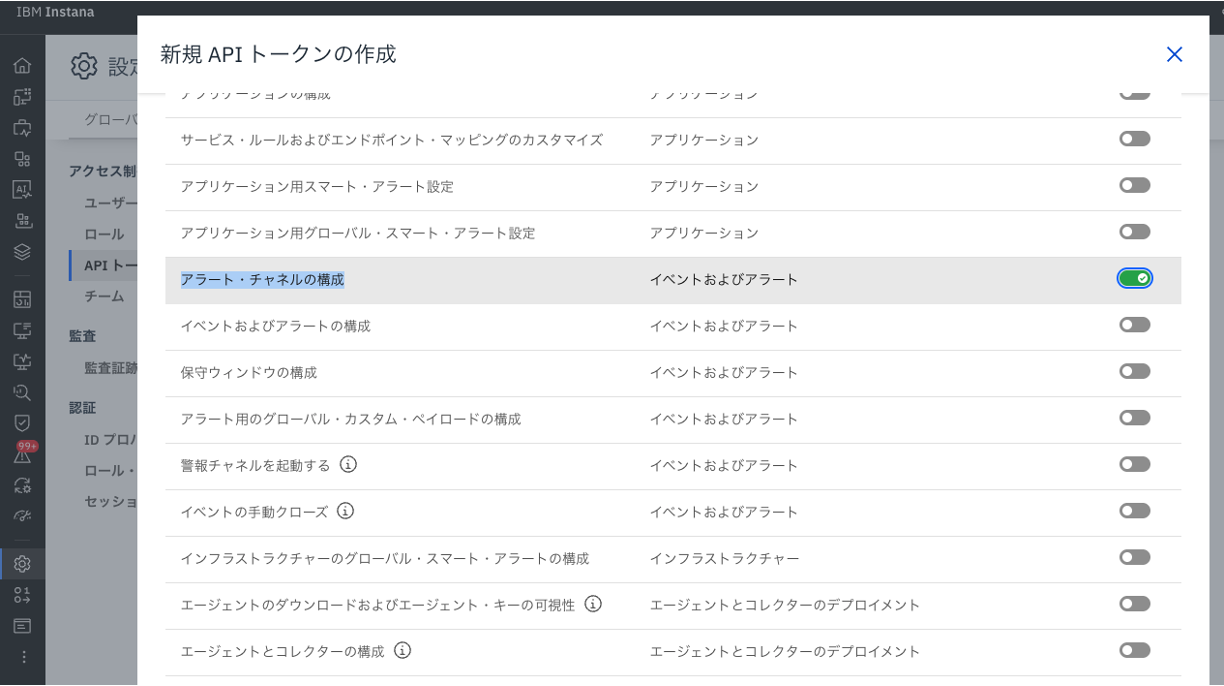
../images/1_Monitoring/apis-instana-terraform-provider/apis-instana-terraform-provider_10.png

  • main.tfを作成します
terraform {
  required_providers {
    instana = {
      source  = "instana/instana"
      version = "5.3.1"
    }
  }
}

provider "instana" {
  api_token = "<取得したAPIトークン>"  
  endpoint = "<バックエンドのドメイン>"
  tls_skip_verify     = false
}

resource "instana_alerting_channel" "my_channel" {
    name = "alert-channel-terraform-test"

    email {
        emails = [
            "user@example.com",
        ]
    }
}
  • terraform planを実行し、アラートチャネルの作成が追加されることを確認します。
% terraform plan

・・・

Terraform will perform the following actions:

  # instana_alerting_channel.my_channel will be created
  + resource "instana_alerting_channel" "my_channel" {
      + id   = (known after apply)
      + name = "alert-channel-terraform-test"

      + email {
          + emails = [
              + "user@example.com",
            ]
        }
    }

Plan: 1 to add, 0 to change, 0 to destroy.
  • terraform applyを実行することで、user@example.com宛にアラート情報を送信するアラートチャネルが作成されます。
% terraform apply
・・・

Terraform will perform the following actions:

  # instana_alerting_channel.my_channel will be created
  + resource "instana_alerting_channel" "my_channel" {
      + id   = (known after apply)
      + name = "alert-channel-terraform-test"

      + email {
          + emails = [
              + "user@example.com",
            ]
        }
    }

Plan: 1 to add, 0 to change, 0 to destroy.

・・・

instana_alerting_channel.my_channel: Creating...
instana_alerting_channel.my_channel: Creation complete after 1s [id=<id number>]
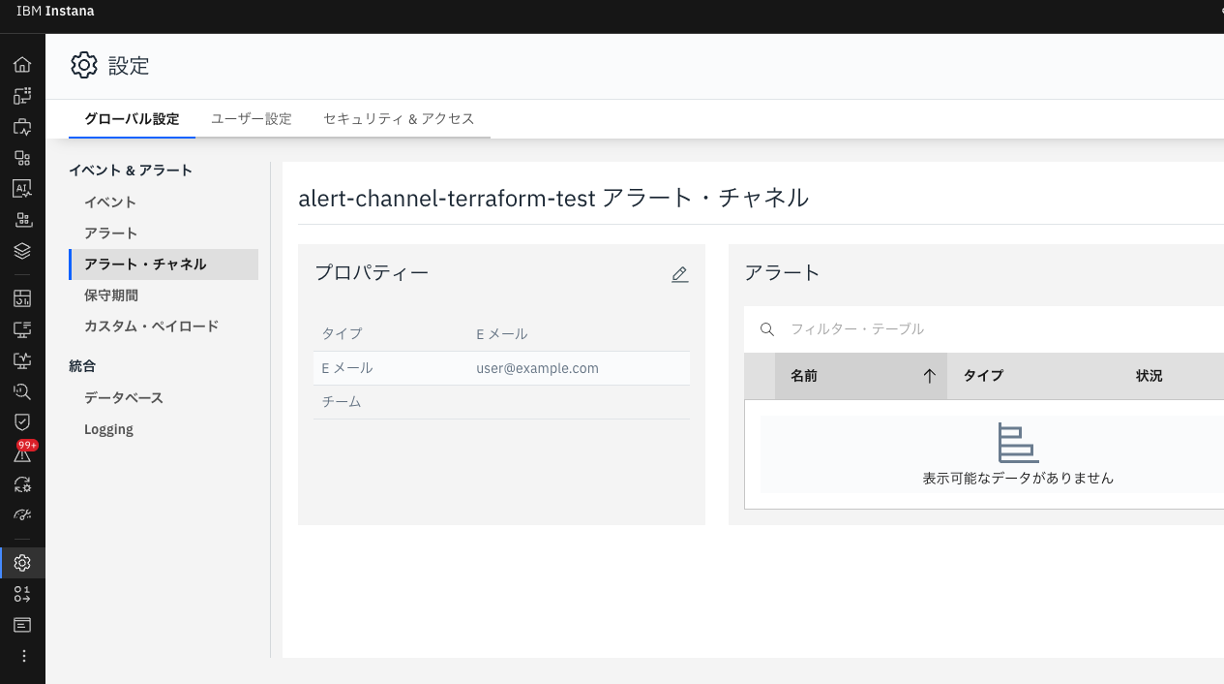
  • Instana UIでもアラートチャネルが作成されていることを確認できます

../images/1_Monitoring/apis-instana-terraform-provider/apis-instana-terraform-provider_20.png

既存のアラートチャネルへの変更

  • 先ほど作成したアラートチャネルに対して、test@example.comというユーザーを追加したい場合、main.tfinstana_alerting_channelのリソースブロックを変更し、再度terraform plan/applyを実行します
resource "instana_alerting_channel" "my_channel" {
    name = "alert-channel-terraform-test"

    email {
        emails = [
            "user@example.com",
            "test@example.com",
        ]
    }
}
 % terraform apply

・・・

Terraform will perform the following actions:

  # instana_alerting_channel.my_channel will be updated in-place
  ~ resource "instana_alerting_channel" "my_channel" {
        id   = "<id number>"
        name = "alert-channel-terraform-test"

      ~ email {
          ~ emails = [
              + "test@example.com",
                # (1 unchanged element hidden)
            ]
        }
    }

Plan: 0 to add, 1 to change, 0 to destroy.

・・・

instana_alerting_channel.my_channel: Modifying... [id=<id number>]
instana_alerting_channel.my_channel: Modifications complete after 1s [id=<id number>]

Apply complete! Resources: 0 added, 1 changed, 0 destroyed.
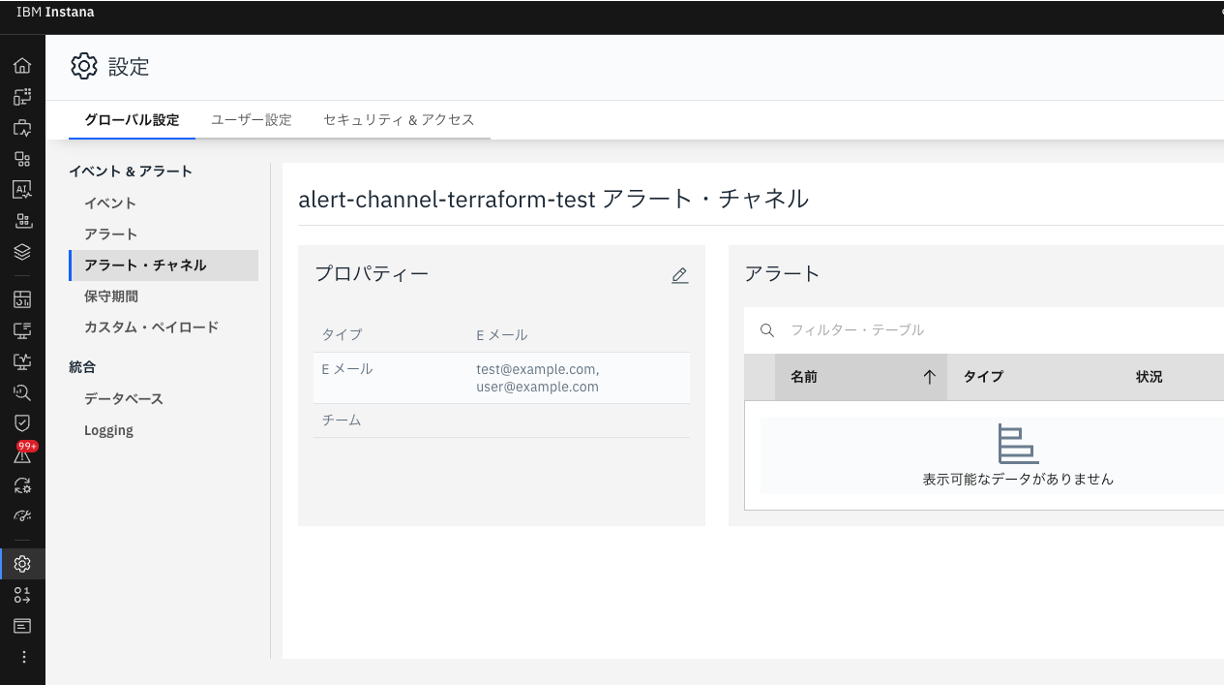
  • Instana UIでもtest@example.comが追加されていることを確認できます

../images/1_Monitoring/apis-instana-terraform-provider/apis-instana-terraform-provider_30.png