
Pipeline Settings#
This section covers project-level settings that affect how pipelines are executed.
DataStage Optimized Pipeline Runner#
The DataStage optimized pipeline runner compiles pipelines into Python code and runs them directly inside the engine runtime, eliminating the REST API call overhead that the standard runner incurs for every nested pipeline invocation. When used with the Run Pipeline Job component, nested pipeline jobs execute inline instead of being dispatched as separate API calls — most beneficial in workflows with deeply nested or many sequential pipeline stages.
Note
This setting applies to all pipelines in the project. To use a different runner for a specific workflow, run the pipeline from a separate project where the setting is turned off.
Enabling the Optimized Runner#
Warning
The instructions below apply to On-Premises environments only. For SaaS, this option is available only for projects with a remote engine for batch enabled.
You can enable the optimized pipeline runner from project-level settings in the UI:
Create or open an existing project.
In the Manage tab, choose the Pipeline section from the left-side options.
Go to the DataStage optimized pipeline runner section.
Select the Run using optimized pipeline runner option and click Save.
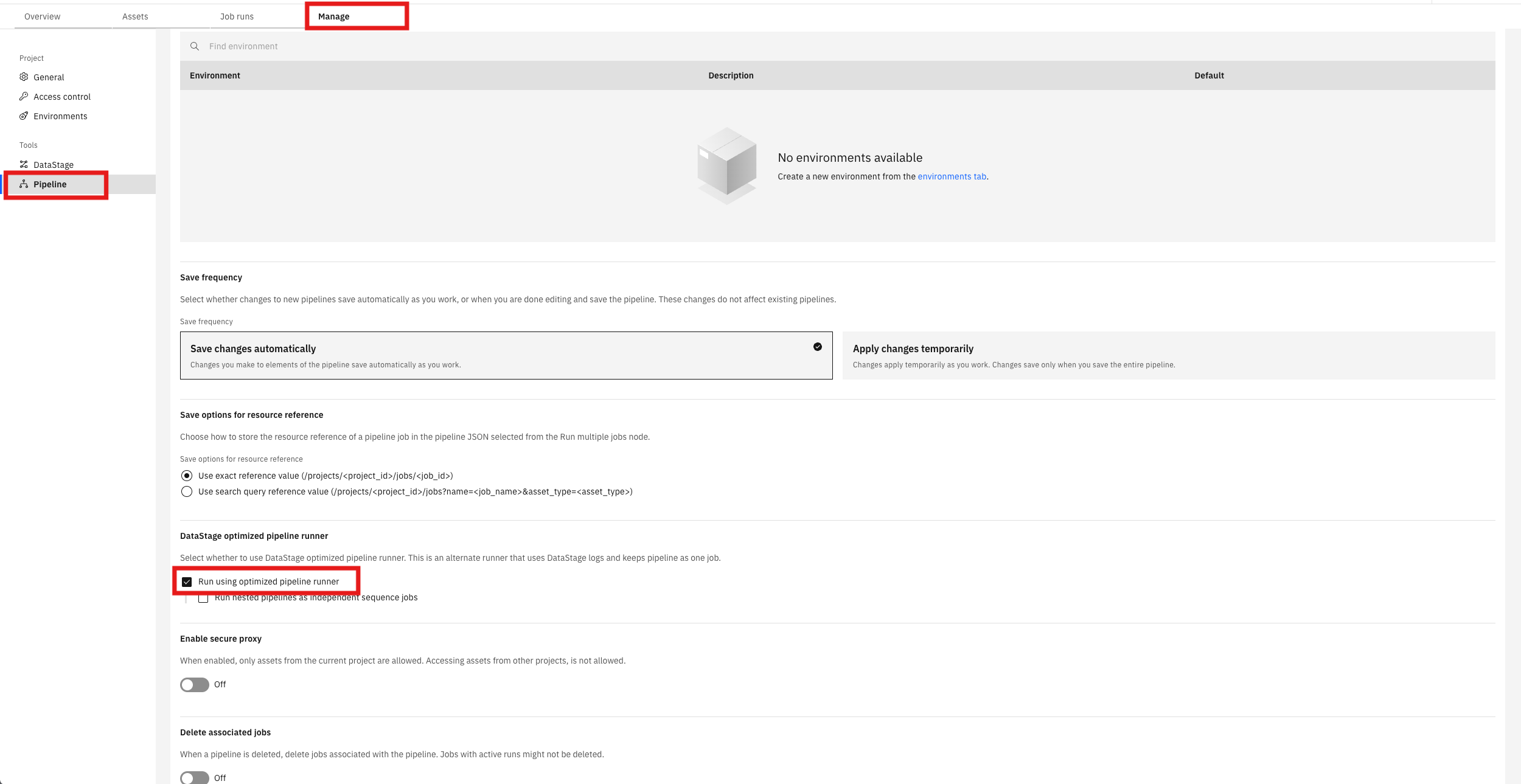
Once enabled, all new pipelines in the project run using the optimized runner. Open an existing pipeline from Assets → Flows → Pipelines and click Run pipeline to execute it with the optimized runner.
Working with the Optimized Runner via the SDK#
You can read and update the optimized pipeline runner setting programmatically using the
Project.pipeline_settings property.
Reading the Current Setting#
>>> project.pipeline_settings.runner_type
<PipelineRunnerType.PIPELINE_RUNNER: 'PIPELINE_RUNNER'>
Enabling the Optimized Runner#
>>> from ibm_watsonx_data_integration.services.pipelines.models.pipeline_settings_model import PipelineRunnerType
>>>
>>> project.pipeline_settings.runner_type = PipelineRunnerType.DATASTAGE_OPTIMIZED_RUNNER
>>>
>>> response = platform.update_project(project)
>>> response.status_code
200
>>> project.pipeline_settings.runner_type
<PipelineRunnerType.DATASTAGE_OPTIMIZED_RUNNER: 'DATASTAGE_OPTIMIZED_RUNNER'>
Disabling the Optimized Runner#
To revert to the standard pipeline runner, set the runner type back to
PIPELINE_RUNNER.
>>> project.pipeline_settings.runner_type = PipelineRunnerType.PIPELINE_RUNNER
>>>
>>> response = platform.update_project(project)
>>> response.status_code
200
Tracking Compile Status#
When the optimized runner is enabled, each pipeline must be compiled before it can run.