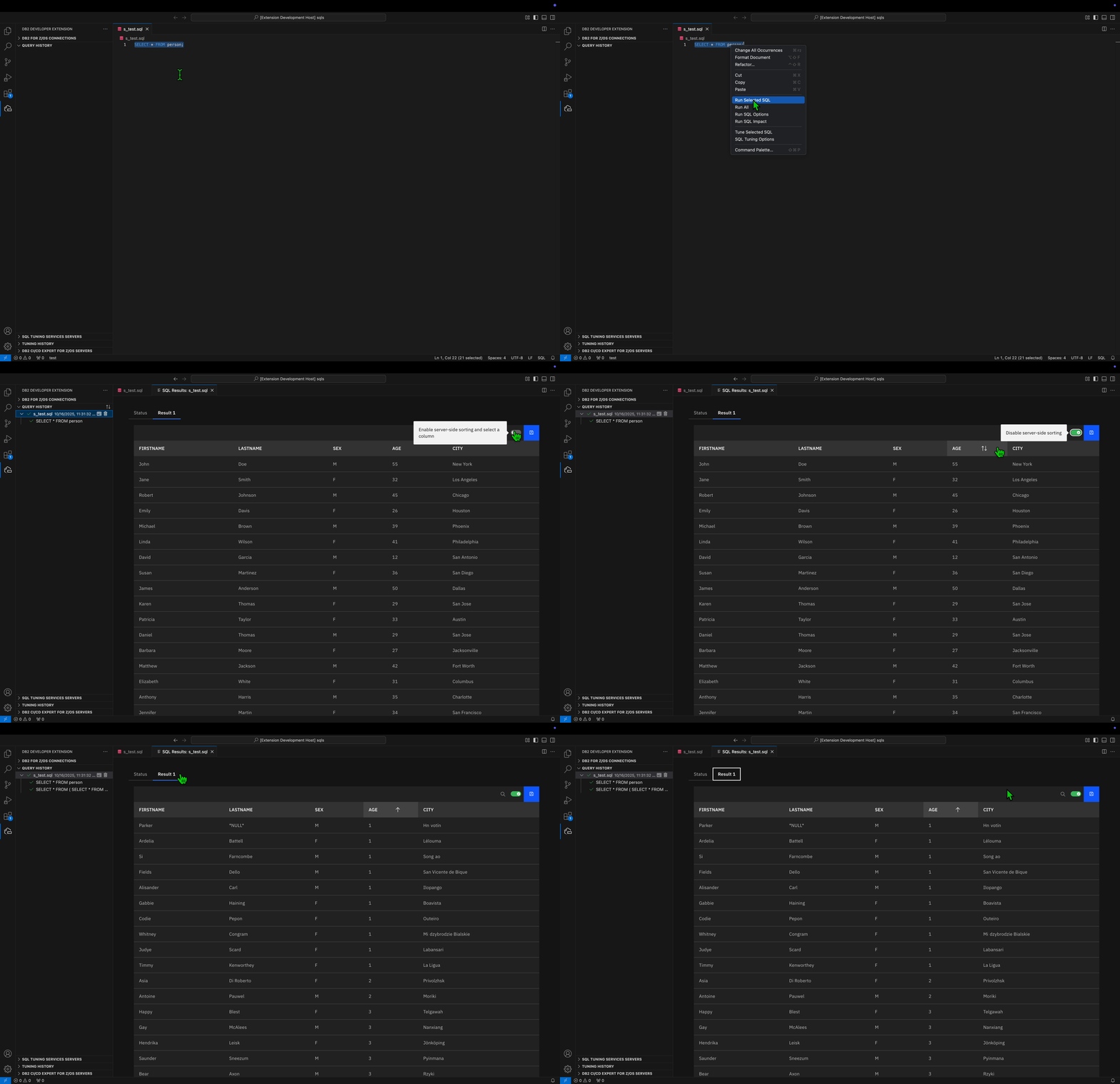
Server-side sorting on an SQL results set
Db2 Developer Extension makes it easy to sort the data in your SQL results for SELECT statements by enabling server-side sorting. You can sort your SQL results in ascending or descending order without having to manually write an SQL statement with an ORDER BY clause. This feature is particularly useful when you have results sets that contain hundreds or thousands of results.
Important: This feature can potentially cause a significant increase in CPU usage because a call is made to the server each time that you click the Sort icon to sort your results.
By default server-side sorting is disabled. To enable server-side sorting to sort your SQL results for SELECT statements:
-
Turn the Enable server-side sorting toggle on.
-
Select a column header and click the Sort icon.
After you click the Sort icon, in the background, the SELECT statement is re-executed and appended with the ORDER BY clause followed by the ascending (ASC) or descending (DESC) keywords.
The behavior of the Sort icon is different depending on how many times you click the Sort icon after enabling server-side sorting:
- On the first click of the Sort icon, the data in the column is sorted in ascending order.
- On the second click of the Sort icon, the data in the column is sorted in descending order.
- On the third click of the Sort icon, the data in the column is not sorted.
After you sort your SQL results, click the Status tab to view the updated SELECT statement.